Infrastructure as Code IAM Platform: Identity Governance & Federated Authentication Lab
Purpose: To create an Identity and Access Management lab that simulates core enterprise IAM functionality.
Goals: Create an automated identity pipeline in which updates to an HR application trigger provisioning events that modify identities in Active Directory. These identity changes are then synchronized to an OpenID Connect identity provider, enabling seamless OpenID Connect single sign-on built on OAuth2.
Core Tenet: Every component, from network configuration to container definitions to system services, is declaratively defined, version controlled, and reproducible.
Reason: To demonstrate how modern organizations automate identity lifecycle management, reduce manual provisioning effort, enforce least privilege, and centralize authentication using open standards such as LDAP, OIDC, OAuth2, and TLS.
Project Abstract
This lab builds a complete, self-hosted enterprise IAM pipeline entirely as infrastructure as code on NixOS. A lightweight HR simulator acts as the authoritative source of identity data, feeding a Python/CSV-backed dataset that midPoint consumes to drive Joiner-Mover-Leaver provisioning workflows. midPoint serves as the Identity Governance and Administration engine at the center of the pipeline, maintaining a two-layer identity model of focus objects (the internal representation of a person) and shadow objects (per-resource account state used as a reconciliation ledger). Read-only CSV and read-write Active Directory connectors, built on the Identity Connectors Framework, correlate records on stable identifiers such as employeeNumber and sAMAccountName, and translate them into typed, strength-weighted (strong/weak) inbound and outbound attribute mappings. A role assignment is converted into a concrete AD account through midPoint's assignment → construction → projection model: the Clockwork engine loads all relevant state into an in-memory lens context and executes it in waves, resolving focus-side derived attributes first and projecting them outward to compute a target-state account, which is diffed against the shadow to produce ADD, MODIFY, DISABLE, or DELETE deltas. A Quartz-scheduled reconciliation task drives this cycle through Fetch, Identification, Correlation, and Reaction phases, classifying each shadow as linked, unlinked, unmatched, or deleted and reacting accordingly to keep Active Directory synchronized with the HR source of truth over LDAPS, using a delegated, least-privilege service account scoped to a dedicated organizational unit. Active Directory identities are then synchronized into Keycloak, which acts as the OpenID Connect identity provider, issuing tokens after LDAP-based authentication and embedding department attributes as group claims. A Caddy reverse proxy and oauth2-proxy sit at the edge, enforcing OIDC-based single sign-on and attribute-based access control before any request reaches the protected application.
Every layer of the environment, from network segmentation and firewall rules to container definitions and certificate issuance, is declaratively defined and version controlled, reflecting a zero-trust, fail-then-add design philosophy in which no privilege is granted until a failure demonstrates its necessity. A self-hosted smallstep CA provides PKI for the entire domain, issuing certificates automatically via ACME with strict TLS constraints, while container images are pinned and hash-verified at build time rather than pulled at runtime, eliminating runtime internet access and reducing supply-chain risk. Together, these components demonstrate how modern organizations can automate identity lifecycle management, enforce least privilege, and centralize authentication using open standards such as LDAP, OIDC, OAuth2, and TLS.
Architecture Diagram
Table of Contents
- Infrastructure Design
- Identity Infrastructure
- Recreating the Identity Lab
- Debugging and Troubleshooting
- Future Considerations
- Closing Remarks
- Appendix A — Certificate Generation
- Appendix B — midPoint XML
- Appendix C — PowerShell
- Appendix D — OIDC Verification
Infrastructure Design and Considerations
Host Operating System
While this lab is focused on the design of a complete IAM pipeline, it would be difficult to start anywhere other than the underlying infrastructure. As an avid desktop Linux user and considering current trends in the field, only one option came to mind: NixOS. While not widely known, its functionality is extremely impressive, which led me to this choice.
NixOS is completely infrastructure as code, meaning all packages, networking, system services, and file mounts are declarative. This provided scalability, reproducibility, and disaster recovery. Multiple times throughout the lab, I broke the domain controller and its DNS, or the entire lab's network bridge, among other components. With a simple reboot, I was back in a stable system generation or a previous version of the lab environment.
Networking
As with all my security endeavours, I employ a zero-trust methodology: just enough access, just in time. The network was built from the ground up with that in mind.
Each container's outbound internet access is explicitly enumerated in the forward chain; anything not listed is dropped. All remaining communication occurs over the br-lab network bridge.
When designing the network architecture, I followed the mindset laid out in the IDPro Body of Knowledge, specifically the fail-then-add principle, where infrastructure as code begins with no privileges. When something fails due to insufficient privilege, access is either explicitly granted or an alternative design is chosen.
An example of this occurred during initial configuration of the midPoint container, which required OCI images at runtime. Rather than granting those containers unlimited outbound internet access, an alternative design was chosen instead where images are fetched at build time using Nix's dockerTools.pullImage, pinned to a specific manifest digest, and verified by cryptographic hash before entering the system closure. The containers themselves have no internet access at runtime; the images arrive pre-loaded from the Nix store. This satisfies the just-enough principles more strictly than a runtime pull would, while also eliminating a class of supply-chain risk. The image that was audited is guaranteed to be the image that runs.
Containers
Container design follows the same zero-trust principles as the network, but applied to filesystem access and host interactions instead of connectivity.
Each container is explicitly scoped to only the data and mounts it requires to function. Bind mounts are used intentionally to separate identity-related state, application state, and shared infrastructure components, rather than allowing broad filesystem access.
This approach keeps each service isolated and makes the identity pipeline easier to reason about, since every dependency is explicitly defined at the infrastructure level.
Caddy Reverse Proxy
Caddy sits at the front of a three-layer request chain, terminating TLS for whoami.lab.internal using a certificate obtained automatically through the internal ACME provisioner. Requests are forwarded to oauth2-proxy, which enforces authentication against Keycloak via OpenID Connect before passing traffic upstream. Access is further restricted to users whose Active Directory department attribute resolves to Engineering, mapped through Keycloak as a groups claim.
Identity Infrastructure
I will be describing this from the top of the pipeline down.
Public Key Infrastructure - The Binding Glue
The PKI in the lab is required for the majority of services to run. The reverse proxy requires it, LDAPS requires it, any SSL, TLS, HTTPS, they all require it. Given it's grave importance, much consideration went into ensuring that this service ran securely, but such that it could also provide the containers with everything they needed just in time.
A smallstep CA serves as the certificate authority for the entire environment, establishing localized PKI to issue, manage, and validate cryptographic identities across the lab.internal domain. The CA daemon binds to all interfaces on port 9000, exposing certificate lifecycle services to the rest of the automated infrastructure.
Rather than relying on ephemeral system accounts that could destabilize file ownership across system rebuilds, the configuration explicitly defines a persistent step-ca system user and group with a fixed home directory at /var/lib/step-ca.
To enforce this stateful ownership model, systemd's default dynamic user allocation is disabled and the service is explicitly forced to execute as the step-ca user and group. Additionally, a native ExecStartPre routine runs with elevated privileges before the daemon launches. It fixes ownership across the /var/lib/step-ca directory and leaves the root certificate world-readable so that any service can access it, but not write to it unless you are root.
For storage, the CA circumvents the need for an external relational database by utilizing an embedded Key-Value engine. It is configured with a badgerv2 database instance writing directly to /var/lib/step-ca/db, keeping certificate logs and index states entirely localized, transactional, and performant.
The cryptographic hierarchy relies on an explicit three-part structure defined within the CA settings: the root certificate, the intermediate certificate, and the intermediate private key. The highly sensitive intermediate private key is decrypted at runtime using a designated local credential file located at /var/lib/step-ca/secrets/password.
To handle incoming certificate signing requests, the CA exposes two highly targeted provisioner interfaces, a JSON Web Key Provisioner, and an ACME Provisioner. The JWK provisioner is tied to admin@lab.internal for manual admin tasks. It uses a P-256 elliptic curve key with the private key encrypted and stored inline as an encryptedKey. This keeps the private key safely encrypted and embedded right in the config file. On the other hand, the ACME provisioner opens an automated certificate management environment endpoint allowing target servers, proxies, and internal applications to request, challenge, and renew their TLS certificates without human or administrative intervention.
To guarantee that the CA itself cannot be leveraged as an attack vector for cryptographic downgrades, the configuration enforces tight constraints on all inbound transport layer traffic.
The TLS block locks down protocol negotiation by restricting the valid range exclusively to modern implementations, requiring a minimum version of 1.2 and a maximum version of 1.3. Furthermore, the permitted handshake paths are limited to high strength, forward-secret cipher suites, only allowing for TLS using ECDHE key exchange, ECDSA or RSA authentication, AES-128 GCM encryption, and SHA-256 integrity.
By combining strict transport rules, automated ACME provisioning, and a persistent system environment, the PKI provides an isolated, secure foundation for the rest of the lab's identity governance.
HR Application - The Source-of-Truth
The HR "application", in reality, is just a lightweight python web wrapper over a CSV-backed dataset. It acts as the authoritative source of identity lifecycle changes within the lab.
The container exposes a shared bind mount into the midPoint environment, allowing identity updates to be written directly into a location consumed by the provisioning engine. This keeps the HR system intentionally simple while still simulating a realistic upstream identity source.
While I could have found and used a proper free and open-source application, this lab is to explore identity tools, and eventually identity as code, therefore, I did not deem it necessary.
midpoint - Identity Governance and Administration
midPoint serves as the core Identity Governance and Administration engine, automating Joiner-Mover-Leaver workflows and enforcing identity lifecycle policy across the lab. It sits at the centre of the identity pipeline by consuming upstream HR data, maintaining a canonical internal user model, and projecting identity state outward to Active Directory. With all this in mind, a significant portion of this writeup will be dedicated to midPoint.
midPoint Architecture
Why midPoint
MidPoint was selected because it exposes identity governance concepts directly. Unlike many commercial platforms that abstract internal mechanics behind proprietary workflows, midPoint exposes reconciliation, correlation, role inducement, projections, mappings, and synchronization behavior as first-class objects. The goal of this lab was not simply to provision accounts, but to understand how modern identity governance systems model identities and automate lifecycle management.
Design Philosophy
midPoint operates on a declarative identity model, making it a perfect fit for this lab. Rather than scripting individual provisioning actions, administrators define what the identity state should look like, and midPoint continuously reconciles against that declaration. This aligns closely with the Infrastructure as Code principles that underpin the rest of the lab.
Container Infrastructure & Persistence
The midPoint engine is deployed as a stateless container via Podman, with all persistent state externalized to a local PostgreSQL instance. This separation means the container itself is disposable and the identity repository survives restarts, rebuilds, keeping redeployments intact.
MidPoint's database initialization is non-trivial. It requires specific PostgreSQL extensions and a multi-schema setup covering the core repository, the Quartz job scheduler, and the audit log. To handle this deterministically within NixOS without granting the container runtime internet access, a native oneshot systemd service (midpoint-pg-init) orchestrates the entire initialization at boot: injecting extensions, extracting schema SQL directly from the container image, and applying it in the correct order via isolated podman run invocations against the local PostgreSQL socket.
Similarly to the network infrastructure, the database permissions were built using a fail-then-add methodology. This culminated in midPoint's shadow partition tables (m_shadow and its derivatives) being created by the PostgreSQL superuser during schema initialization, and midPoint connects as an unprivileged application user. The initialization service explicitly transfers ownership of these tables to the midPoint database user, which is required for the shadow lifecycle operations that happen at runtime during reconciliation. This ensures any part of the database midPoint does not need access to, cannot be modified by the midPoint user account, allowing for least-access principle in the database.
Persistence and data ingestion are handled through intentional bind mounts. The midPoint configuration and repository state live on the host filesystem, outside the container. The HR CSV data is exposed into midPoint's file intake path via a shared bind mount from the HR host, the same directory the HR application writes to is the directory midPoint reads from, with no copying or synchronization required.
TLS trust for the LDAPS connection to Active Directory is also handled at this layer. Rather than manually importing the lab PKI certificate into midPoint's Java truststore at runtime, the CA certificate is declared in the NixOS configuration and injected into the truststore as part of the system build. This keeps certificate trust consistent with the declarative approach used everywhere else in the lab and ensures it survives container rebuilds without any manual intervention.
Identity Model
midPoint maintains a two-layer identity model that is worth looking into before getting to the connector configuration: focus objects and shadow objects.
Focus objects are the internal representation of a person. In the lab, it's populated from the HR source of truth via inbound mappings and enriched by object template rules. It is the identity that midPoint reasons about when making provisioning decisions.
Shadow objects are midPoint's representation of an account as it exists on a specific resource, one shadow per resource per user. Shadows track the last known state of each account and serve as the reconciliation ledger. They are stored in a partitioned PostgreSQL table, keyed by resource OID.
When midPoint reconciles, it compares the shadow's last known state against what it finds on the resource. Discrepancies drive the provisioning actions.
Derived Attributes and Role Assignment
There is a single piece of logic that sits outside the CSV attribute mappings: the automatic provisioning of the AD User role on every imported user. The documented midPoint pattern for both is a system-level object template applied to all UserType objects. Templates are the natural place for cross-cutting derivation and assignment rules, and that's where this logic was originally designed to live.
In practice, the 4.10.1 schema doesn't expose the linkage points that pattern depends on. An <inducement> is valid on roles, orgs, and archetypes, but not on an object template; objectTemplateRef is no longer recognised as a child of a resource's object type definition; and objectPolicyConfiguration is also no longer a recognised element of system configuration. Each of these is the documented way to either define the logic or wire a template into the pipeline, and each fails schema validation on this version. A template object built during this investigation still exists in the repository, but nothing references it, so it has no effect and is another artifact of the lab's fail-then-add structure.
Both pieces of logic ended up living as <inbound> mappings directly on the HR CSV resource's schema handling, the one place that reliably accepted custom expressions throughout. fullName is derived by a secondary inbound on the firstName attribute that reads both firstName and lastName off the shadow and concatenates them with a small Groovy script. The AD role assignment is a secondary inbound on employeeNumber: its expression ignores the employeeNumber value entirely and unconditionally returns a reference to the AD provisioning role, targeted at the user's assignment container. Every CSV row carries an employeeNumber, so this fires for every imported user on each reconciliation pass, and because the midPoint administrator has no CSV-resource shadow, it's excluded without an explicit condition.
One consequence of this approach is that the role assignment isn't conditioned on activation status the way the original object-template design intended, instead it fires for active and inactive users alike. When a user whose HR record goes inactive, they still get the AD User role inducement, though their AD account is disabled via the activation mapping on the same reconciliation pass, so the role provisioning doesn't translate into usable access.
Synchronization and Connector Mechanics
midPoint abstracts target system connectivity through the Identity Connectors Framework. All communication with external systems, whether reading from the CSV or writing to Active Directory, flows through ICF connector instances, each backed by a resource definition that describes the schema, mappings, correlation rules, and synchronization reactions for that system.
The HR CSV connector is configured as a read-only source. Write capabilities are explicitly disabled, preventing midPoint from ever modifying the CSV since the HR application needs to be the sole writer to prevent conflicts. Inbound mappings translate CSV fields into typed midPoint user attributes, and a correlation rule on employeeNumber allows midPoint to reliably match CSV rows to existing users across reconciliation cycles, even if other attributes change. The employee number was chosen as the anchor because all other fields are considered malleable, as names and roles can change, but the employee number is assigned as a birthright identifier and is never modified. This is a very standard practice, but worth reiterating here.
The Active Directory connector operates in the opposite direction. Outbound mappings push midPoint user attributes into AD object attributes, targeting the Lab Users OU. A correlation rule on sAMAccountName prevents duplicate provisioning if an account already exists. Activation state flows through automatically: when the HR active field goes false, the user's administrative status in midPoint flips to DISABLED, and the AD connector propagates that as an account disable on the next reconciliation.
Each mapping also carries a strength property (strong, normal, or weak) that determines how midPoint behaves when the target attribute already has a value. A strong mapping overwrites the target value unconditionally, even if it was set manually outside midPoint. A weak mapping only applies if the attribute has no existing value at all. In this lab the outbound mappings to AD are configured as strong, meaning any manual attribute edits made directly in Active Directory will be corrected back to midPoint's computed values on the next reconciliation pass. This is the intended behavior for a system where midPoint is the authoritative source, but it's an important operational detail: drift introduced outside midPoint will not survive reconciliation.
Synchronization reactions define what midPoint does when it encounters each possible state during reconciliation. The full set of situations midPoint can classify a shadow into covers more ground than it might initially appear. A linked shadow has a known focus object and the two are associated; the reaction here is typically to synchronize any attribute drift. An unmatched shadow has no correlation result at all, meaning no focus object can be found for it; the reaction is to create a new focus. A deleted shadow corresponds to a resource account that has disappeared; the reaction is to delete or archive the focus. The situation type that is easy to overlook is unlinked: a shadow where midPoint's correlation rule finds a matching focus object, but the two have never been formally linked. This commonly occurs during initial onboarding or after a schema migration, and the appropriate reaction, typically link or synchronize, is distinct from the unmatched case where no match exists at all. Together these reactions form the automated JML workflow, removing manual intervention from standard identity lifecycle events.
Finally, there is the credential section of the object types, which allows for automatic creation of a password based on a set of rules. Between the options, generating a password was the preferred approach here, but a literal fixed password can be selected, or a Groovy script can be written for further customization.
Reconciliation itself is driven by midPoint's built-in Quartz scheduler. Each run executes a four-phase pipeline: Fetch (read current state from the resource), Identification (locate the corresponding shadow), Correlation (match the shadow to a focus user), and Reaction (execute the policy action based on the detected delta). In newer versions of midPoint a distinct Classification phase sits between Identification and Correlation, though the observable behavior of this pipeline is consistent across the versions relevant to this lab.
Role Assignment, Construction, and Projection
Understanding how a role assignment translates into an account on a target system requires looking at midPoint's assignment → construction → projection model, which is the mechanism that makes the declarative identity approach concrete.
When midPoint assigns the AD User role to a focus object, no account is created directly. The assignment adds an entry to the user's assignment container, and the role itself carries a construction: a declaration that any holder of that role should have an account on the AD resource, with a specific kind and intent. That construction is what links the abstract policy to a concrete target system.
From there, midPoint's Clockwork engine takes over. Before any mapping is evaluated or any connector is called, Clockwork loads all relevant state, including the focus object, its current assignments, every associated shadow, and the requested change, into an in-memory lens context. This context is the single shared model for the entire execution cycle. Clockwork collects every construction implied by the user's current assignments and evaluates all mappings against this context, which is what allows it to detect conflicts and apply policy atomically within a single operation, before anything is committed to the database or sent through a connector.
Clockwork then executes in waves rather than a single pass. Wave 0 resolves focus-side changes: computing derived attributes, evaluating inbound mappings, and settling the focus object's final state. Wave 1, and any further waves if needed, handles projections. This sequencing matters because outbound mappings on a projection may depend on attributes that were themselves just derived in wave 0. Without the wave structure, a mapping that reads fullName to compute an AD cn could race against the Groovy script that assembled fullName from firstName and lastName in the first place.
Within each wave, Clockwork evaluates all outbound mappings defined on the resource's object type, such as fullName → cn, name → sAMAccountName, DN construction, activation state, password generation, and so on, against the lens context to produce a complete target-state account object held in memory. This target state is then compared against the corresponding shadow object, midPoint's record of what currently exists on the resource. The difference between the two becomes a delta: in the case of a new user, an ADD operation carrying every mapped attribute. That delta is handed to the provisioning layer, which routes it through the ICF connector framework and translates it into a real LDAP operation against the target system.
The deprovisioning path follows the same model in reverse, and it is worth tracing explicitly. When a user's HR record disappears from the CSV entirely, the reconciliation pass detects no source row for the existing shadow. The synchronization reaction for the deleted situation fires, which removes the focus object. With the focus gone, no assignments remain, and therefore no constructions are implied. Clockwork computes a projection with no target state, which produces a DELETE delta for the corresponding AD shadow. That delta flows through the ICF connector as an LDAP delete operation, removing the account from Active Directory. The shadow record in midPoint's PostgreSQL repository transitions to a DEAD state and is eventually cleaned up. The account disable that occurs when a user goes inactive is a softer version of this: the focus object and role assignment persist, but the activation mapping produces a delta that sets the AD account's disabled flag rather than deleting it, leaving the account in place but inaccessible.
The important distinction across all of this is timing. The Clockwork cycle runs synchronously the moment an assignment is saved or a reconciliation pass fires the inbound role mapping. Reconciliation tasks serve a different purpose: detecting and correcting drift where the AD-side state has diverged from midPoint's shadow, not driving the initial provisioning. The assignment is the trigger; the lens context, wave execution, Clockwork projection, and the connector layer are the mechanism.
Provisioning Architecture
Active Directory - Central Directory
Active Directory serves as the central directory service and runtime identity store for the lab. Using a Windows Server 2022 EVAL iso, the virtual machine, win-srv01, is kept up to date with the latest patches from Microsoft.
The main domain is lab.internal, utilizing a dedicated Lab Users OU as the target container for all provisioned human identities. This OU establishes a strict security boundary and serves as the primary query base for downstream authentication via Keycloak. The reason an organizational unit was chosen over a container is to allow more granular access controls, which are described below.
Operational service accounts, such as svc-midpoint and svc-keycloak, reside outside the user OU. To execute automated Joiner-Mover-Leaver (JML) workflows while enforcing least privilege, administrative control over the Lab Users OU is explicitly delegated to svc-midpoint.
The specific Access Control Entries (ACEs) granted to svc-midpoint on the target OU include:
- User Lifecycle: Create, delete, and manage user accounts (Provisioning and deprovisioning).
- Credential Control: Reset user passwords and force password changes at next logon (Temporary credential injection).
- Identity Reconciliation: Read all user attributes (Drift detection and orphan mitigation).
- Group Lifecycle: Create, delete, and manage groups (Target-system RBAC structures).
- Entitlement Management: Modify group memberships (Dynamic role assignment).
This architecture ensures that only provisioned user identities are exposed to downstream federation layers, while service accounts remain isolated for operational control.
The Keycloak service account requires no such permissions because OpenID Connect will issue any information needed as claims within the token. This will allow Keycloak to perform any and all federation with minimal access, since the authentication context and user attributes are delegated entirely to the identity provider at token issuance.
Keycloak - Identity Federation Provider
Keycloak functions as the identity provider and federation layer for the environment.
It is configured with an LDAP connector to Active Directory, scoped specifically to the Lab Users organizational unit. This restricts authentication visibility to provisioned user accounts only, excluding built-in administrative accounts, guest accounts, and service identities.
While this service can provide identity governance administration, I wanted to leave that entirely to midPoint.
Authentication flows are handled via OpenID Connect (OIDC), where Keycloak issues tokens to downstream applications following successful LDAP-based authentication against Active Directory. This separation ensures that Active Directory remains the authoritative identity store, while Keycloak acts purely as the authentication and token issuance layer.
Attribute-based access control is enforced at the edge proxy layer using a custom group claim passed through the OIDC token. Active Directory is configured to provide the user's department attribute, which Keycloak fetches via an LDAP user attribute mapper and injects into the token as a multi-valued groups claim. Rather than relying on Keycloak role mappers or internal authorization policies, access decisions are evaluated directly by oauth2-proxy using the --allowed-group configuration, ensuring adherence to the principle of least privilege before traffic ever reaches the upstream service.
Whoami - Single Sign-On Application
The Whoami application functions as the primary relying party for demonstrating end-to-end single sign-on.
Authentication is mediated by oauth2-proxy, a reverse proxy that intercepts all requests to the application and enforces the OIDC flow with Keycloak before forwarding traffic to the upstream service. Whoami itself has no authentication capability and is a plain HTTP echo server. oauth2-proxy handles session management via Redis, validates group claims from the access token to enforce department-based access control, and injects forwarded identity headers into the upstream request. These headers, echoed back by whoami, provide direct visibility into the claims asserted by the identity pipeline.
It is integrated with Keycloak using OIDC to facilitate OAuth2. When a user accesses the application, they are redirected to Keycloak for authentication. Upon successful login, Keycloak issues an identity token that is used to establish a session in the application, completing the SSO flow.
This component serves as a validation point for the entire identity pipeline, confirming that provisioning, directory services, and federation are all functioning correctly as a unified system.
Recreating the Identity Lab
Public Key Infrastructure
Bootstrapping the PKI requires running step ca init against the NixOS host, which generates the root certificate, intermediate certificate, and encrypted intermediate key in the paths the module expects. The process also produces a ca.json configuration file that NixOS ignores entirely, as the service configuration is driven by pki.nix at build time. The one artifact from ca.json that does carry forward is the JWK provisioner's encryptedKey value, which was copied out at first-time setup and hardcoded into pki.nix. Because that key is encrypted against the provisioner password, the password file on disk must match what was used when pki.nix was originally written, as a mismatch means the service cannot decrypt its own key on startup.
The step CLI maintains its own trust store independent of the system's. Bootstrapping it against the running CA pins the root certificate by fingerprint and registers the CA URL, which is a prerequisite for any manual certificate operations from the host.
Containers inherit trust through a bind mount that places the root CA certificate at a known path inside each container, removing any need for independent certificate issuance. Caddy on svc01 uses this to validate the internal ACME endpoint and on first start automatically negotiates and retrieves its own certificate for whoami.lab.internal without intervention.
Active Directory does not permit password provisioning over plain LDAP, making LDAPS a hard requirement for midPoint to manage AD passwords. A certificate is retrieved from the CA's web interface and converted into the formats Windows expects, a PFX bundle containing the certificate and private key, with the root CA certificate imported separately into the Trusted Root store so the full chain validates. The LDAPS listener activates automatically once a valid domain controller certificate is present. Connectivity can be confirmed with ldp.exe, where an SSL connection to localhost:636 that completes a successful bind indicates both that the chain is trusted and the listener is active.
Appendix A — Certificate Generation
HR Application
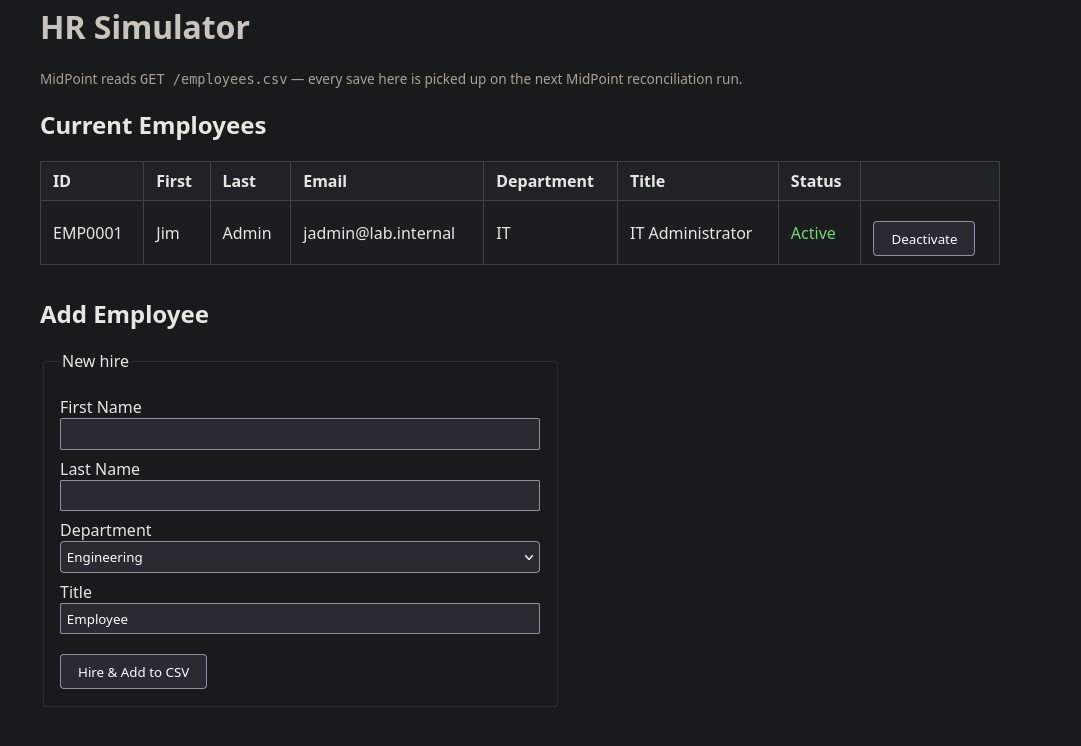
The code expects a specific path for the CSV. My bind mount is set up on a secondary drive in a folder that holds supporting data for the HR app, PKI, and midPoint, but this will need to be changed depending on system configuration. In its current iteration, these are the fields expected:
| employeeNumber | firstName | lastName | department | title | active | |
|---|---|---|---|---|---|---|
| EMP0001 | Alice | Admin | aadmin@lab.internal | Engineering | Engineer | true |
The above is a readable sample only. The real CSV is comma-delimited and available on GitHub.
The HR application is at http://hr01.lab.internal:8888/ and contains just the essentials for creating new rows using the above schema. When the CSV is updated, the changes propagate into the midPoint folder automatically.
midPoint
While the functionality between midPoint and SailPoint IIQ are very similar, the naming conventions differ significantly. The table below maps midPoint concepts to their SailPoint equivalents for reference.
| Concept | midPoint Term | SailPoint IIQ Term |
|---|---|---|
| Connected Target System | Resource | Application |
| Account on a Target System | Shadow / ShadowType | Link / Account |
| Raw System Privileges | Attributes / Entitlements | Entitlements |
| Logical Collection of Access | Role / Archetype | Bundle / IT Role / Business Role |
| How Privileges are Assigned | Assignment / Inducement | Role Assignment / Direct Entitlement |
| Data Pulling Mechanism | Inbound Mapping / Synchronization Task | Aggregation Task |
| Data Pushing Mechanism | Outbound Mapping / Provisioning | Provisioning / Workflows |
| Correlating Accounts to People | Correlation Expression | Correlation Rule |
| Periodic Access Reviews | Access Certification | Access Review / Certification |
midPoint terminology will be used throughout. Consult the table above when comparing against SailPoint.
CSV Resource Connector
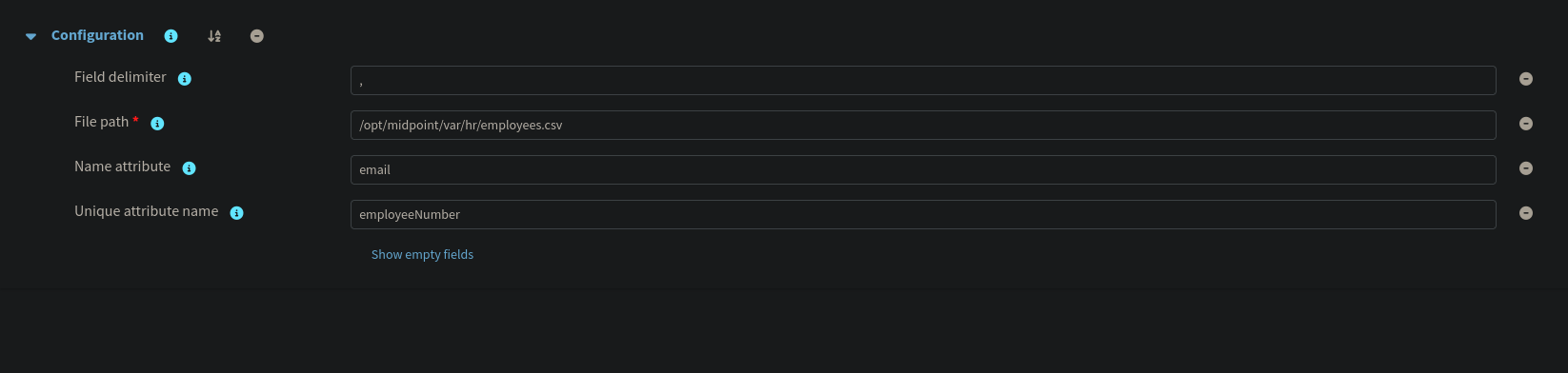
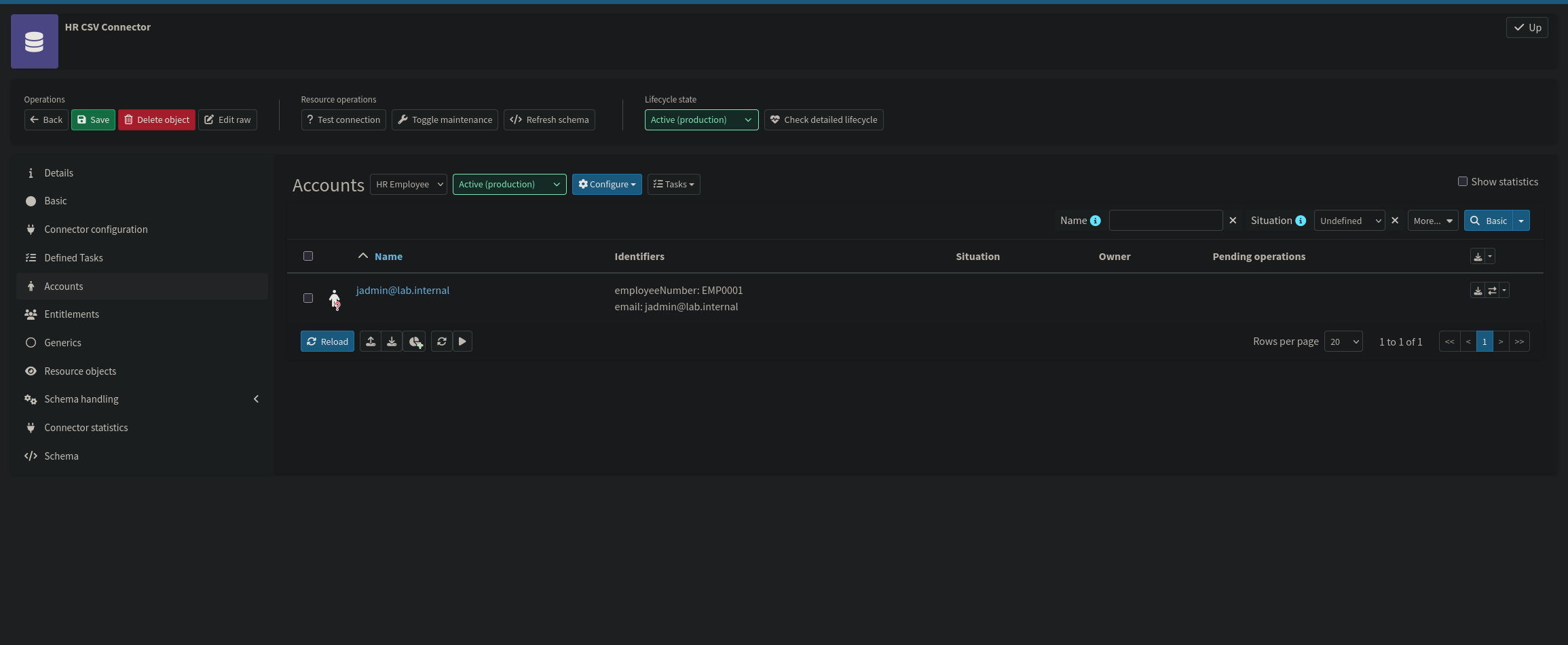
The first resource to configure is the HR CSV connector. midPoint ships with a native CSV connector, making the initial setup straightforward. The connector is pointed at /opt/midpoint/var/hr/employees.csv, the path inside the container where the HR bind mount lands. The unique attribute is set to employeeNumber, which gives midPoint a stable anchor for correlating CSV rows to shadow objects across reconciliation cycles regardless of other attribute changes.
Once the connector is saved, use the Test Connection button to verify midPoint can read the file before proceeding to schema and mapping configuration.
To start this section, go to the newly created resource, then Schema Handling → Object Types. There are many options here but the three necessary for the lab are the Mappings, Synchronization, and Correlation tabs.
Schema
midPoint performs schema discovery against the CSV, automatically detecting all column headers as attributes of the AccountObjectClass. No manual schema definition is required as the discovered attributes map directly to the CSV columns.
Object Type & Mappings
The object type is configured with Kind Account, Intent default, and Focus Type User, telling midPoint that each CSV row corresponds to a midPoint user object. Write capabilities are explicitly disabled on this connector to allow HR to remain the source of truth.
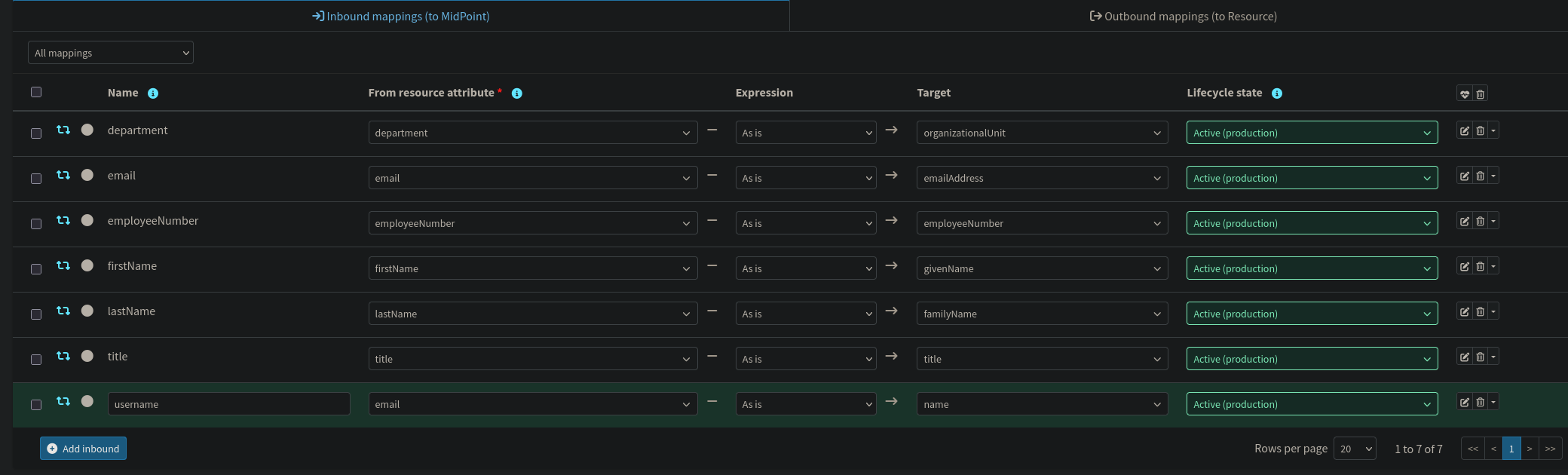
Inbound mappings translate CSV fields into typed midPoint user attributes:
| CSV Field | midPoint Attribute | Strength | Notes |
|---|---|---|---|
employeeNumber | employeeNumber | Strong | Correlation key |
firstName | givenName | Strong | |
lastName | familyName | Strong | |
firstName + lastName | fullName | Strong | Script: firstName + ' ' + lastName; secondary inbound on firstName |
email | emailAddress, name | Strong | Username set from email |
department | organizationalUnit | Strong | |
title | title | Strong | |
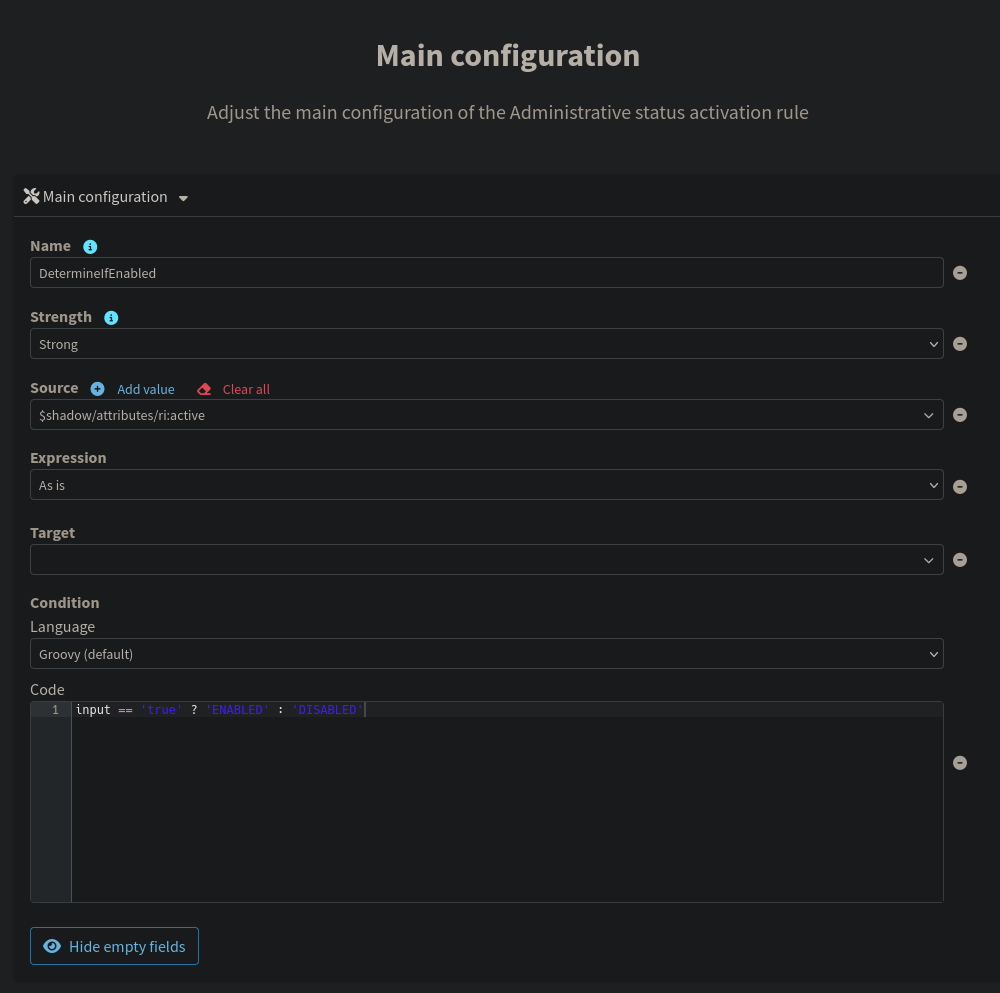
active | activation/administrativeStatus | Strong | Script: input == 'true' ? 'ENABLED' : 'DISABLED' |
All inbound mappings from the HR source are configured as strong. Since this connector is the authoritative source of truth, midPoint should always overwrite the corresponding focus attributes with whatever the CSV contains, even if those attributes were modified directly in the repository between reconciliation cycles. The active field requires a Groovy expression to convert the CSV string to midPoint's expected enum values. The fullName mapping similarly requires a script since it combines two source attributes; it is implemented as a secondary inbound on the firstName attribute that reads both firstName and lastName off the shadow at evaluation time.
Correlation
Correlation is configured on employeeNumber with exact match. This is the rule midPoint uses to determine whether an incoming CSV row matches an existing midPoint user. If the employeeNumber is already known, the account is linked rather than creating a duplicate.

Synchronization Reactions
Four reactions cover the complete identity lifecycle:
| Situation | Action | Lifecycle Event |
|---|---|---|
Unmatched | Add focus | New hire → create midPoint user |
Linked | Synchronize | Attribute change → sync updates |
Unlinked | Link | Existing user found but not yet linked → link without creating |
Deleted | Delete focus | Termination → remove user |
The Unlinked situation deserves attention because it is easy to overlook. It occurs when midPoint's correlation rule finds a focus object that matches an incoming shadow, but the two have never been formally associated, a common state during initial onboarding runs or after a repository migration. The Link reaction handles this without creating a duplicate; without it, midPoint would either error or leave the shadow orphaned.
Role Auto-Assignment via Inbound Mapping
The inbound mapping on the CSV resource configuration handles something that doesn't fit cleanly into the mapping table: automatically granting the role that forces all shadows to be provisioned to AD. This is the final step in the identity governance pipeline, ensuring the role inducement and the AD account it provisions are in place without any manual assignment.
The documented midPoint solution for this is a system-level object template: define a mapping that targets the user's assignment container and returns a reference to the role, then link that template to the resource (or to all UserType objects via system configuration) so it fires during reconciliation. Several variations on this pattern were tried against this resource and against a dedicated object template object, and all of them failed schema validation in 4.10.1. See the Debugging and Troubleshooting section for each individual failure and information regarding it.
The one element that was reliably accepting custom expressions throughout was <inbound>, already in use for every CSV-to-attribute mapping. An <inbound> can carry a <value> expression and can target assignment as its path just as well as it targets givenName or emailAddress.
The working configuration adds a second <inbound> to the employeeNumber attribute, alongside the existing inbound that maps it to the user's employeeNumber property. employeeNumber was chosen as the attachment point because every CSV row is guaranteed to carry one as it's the anchor for every shadow. Because the <value> expression doesn't reference employeeNumber's actual value, it always evaluates to the same role reference regardless of what's in that column; the attribute is just a convenient, always-present hook to attach the mapping to. The midPoint administrator account has no shadow on this resource at all, so the mapping never fires for it, which keeps the built-in admin account from picking up the AD role.
Once this inbound mapping is present, a reconciliation run against the HR CSV resource adds an assignment to the AD provisioning role on every user it processes. That assignment is what the AD connector's construction evaluates, which is what actually creates the account in Lab Users and provisions its attributes on the next AD reconciliation.
Active Directory Resource Connector
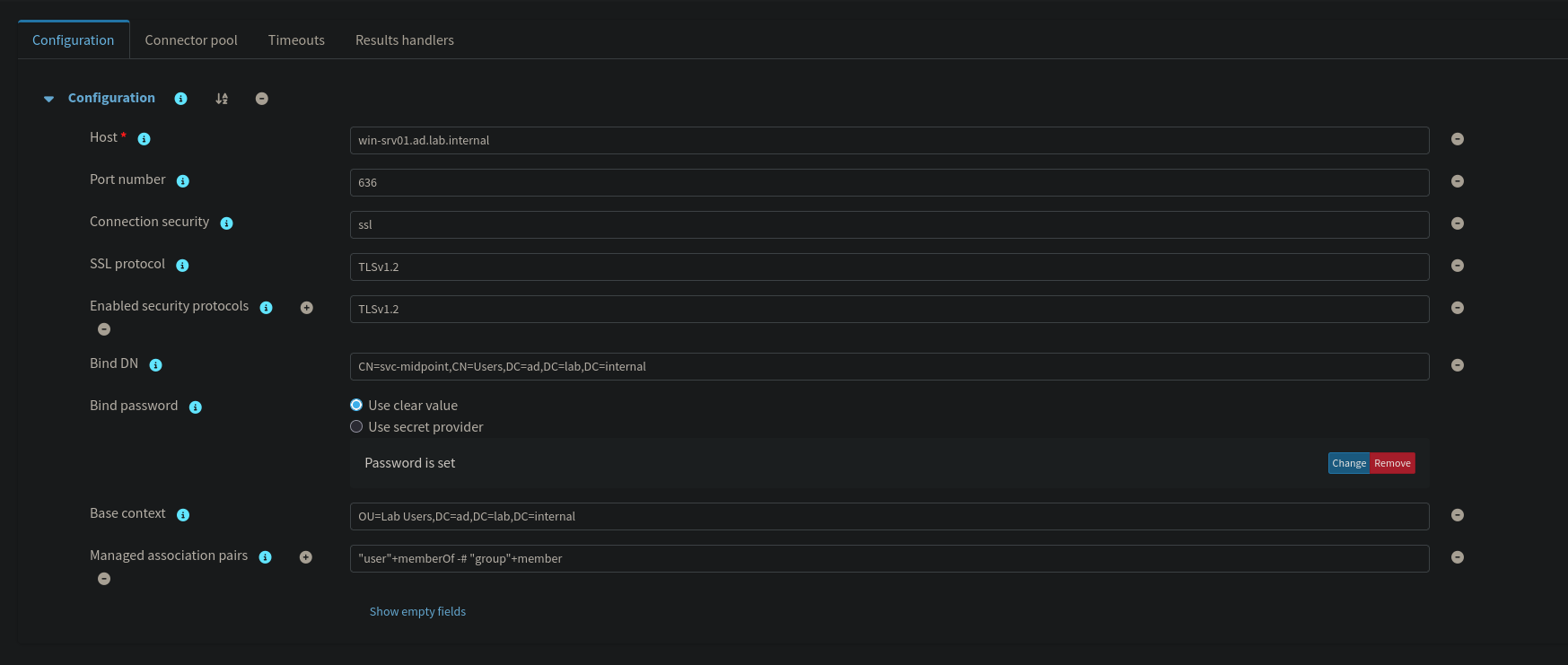
The AD connector uses midPoint's native LDAP connector for Active Directory. Connection details point to win-srv01.ad.lab.internal using the svc-midpoint service account, with the base context scoped to OU=Lab Users,DC=ad,DC=lab,DC=internal, which restricts midPoint's operational scope to the target OU only. Password configuration requires LDAPS, so in Connection Security, set the protocol to ssl with TLSv1.2, as TLSv1.1 is blocked by the PKI while TLSv1.3 is not offered in 4.10.1.
Certificate trust for the LDAPS connection is managed in the NixOS configuration rather than handled manually at runtime. The lab PKI CA certificate is declared in the NixOS config and injected into midPoint's Java truststore as part of the system build, keeping it consistent with the declarative approach used throughout the lab and ensuring it survives container rebuilds without intervention. Once the configuration is applied, use the Test Connection button to verify the LDAPS connection before proceeding to schema and object type configuration.
Schema
The schema selection includes two object classes: user (mapped as Kind Account) and group (mapped as Kind Entitlement). This enables both user provisioning and group membership management through a single connector. In this lab, the group entitlement class is defined in the schema but not actively used; no group membership mappings or entitlement associations are configured. It is included so the connector schema accurately reflects the directory's object model and can be extended later without reconfiguring the connector from scratch.
Similarly to the CSV connector, once creation is done, test the connection with Test Connection, then proceed to defining the object types.
Object Type & Mappings
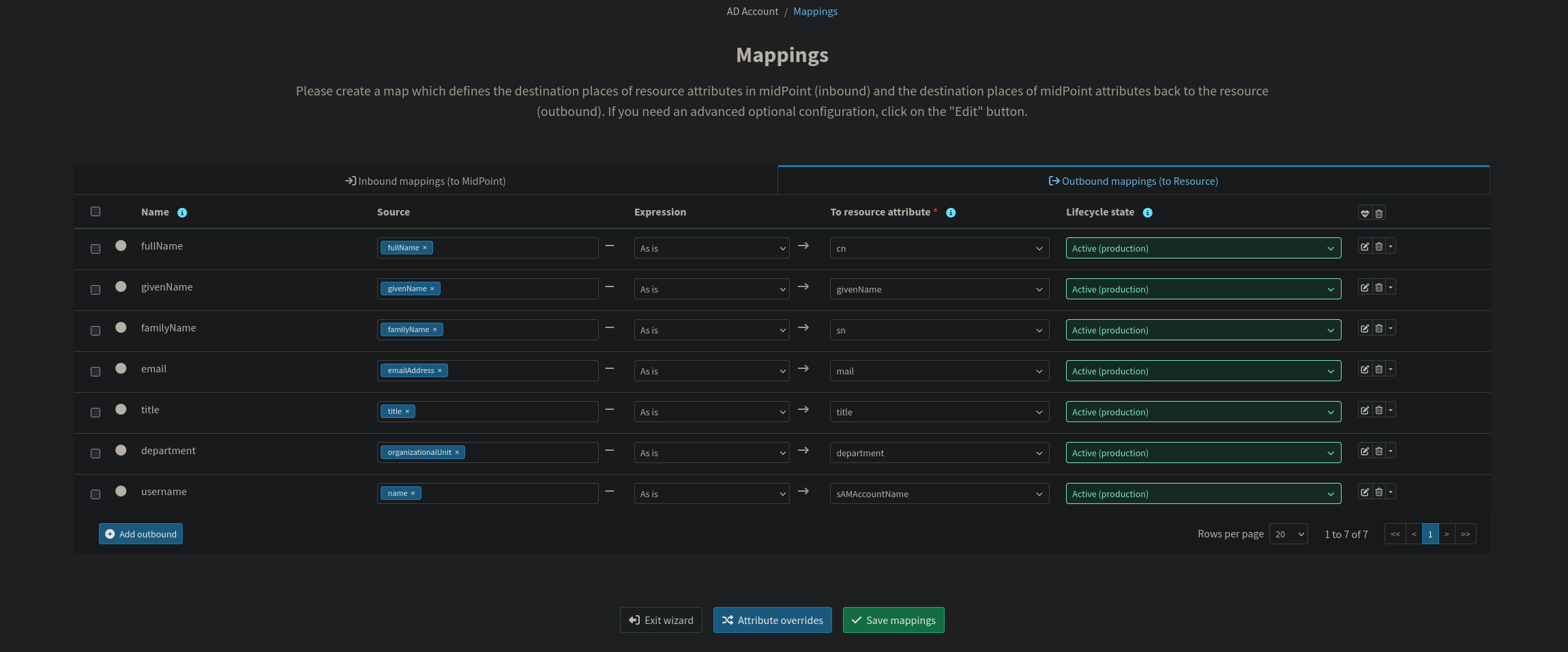
The object type is configured with Kind Account, Intent default, and Focus Type User. Outbound mappings project midPoint user attributes into AD:
| midPoint Attribute | AD Attribute | Strength | Notes |
|---|---|---|---|
fullName | cn, displayName | Strong | Both required for AD account creation |
givenName | givenName | Strong | |
familyName | sn | Strong | |
emailAddress | mail | Strong | |
title | title | Strong | |
organizationalUnit | department | Strong | Maps to Organization tab in ADUC |
name | sAMAccountName | Strong | AD login name |
activation/administrativeStatus | activation/administrativeStatus | Strong | Propagates ENABLED/DISABLED to AD account |
| (expression) | dn | Strong | Script: constructs DN from cn and target OU |
All outbound mappings are configured as strong, meaning any attribute drift introduced by a manual edit directly in Active Directory will be overwritten on the next reconciliation pass. midPoint is the authoritative source for these attributes, and the strong strength setting enforces that. The one mapping that requires additional attention is the Distinguished Name. LDAP objects cannot exist without a DN, and midPoint does not construct one automatically; it must be defined as an explicit outbound mapping using a Groovy expression that assembles the DN string from the user's cn and the target OU path (OU=Lab Users,DC=ad,DC=lab,DC=internal). Omitting this mapping causes account creation to fail at the connector layer with an LDAP schema violation. The activation mapping is equally important to include explicitly: without it, the ENABLED/DISABLED state that midPoint tracks internally when an HR record goes inactive will never propagate to AD, leaving the directory account active regardless of the user's lifecycle state.
Correlation
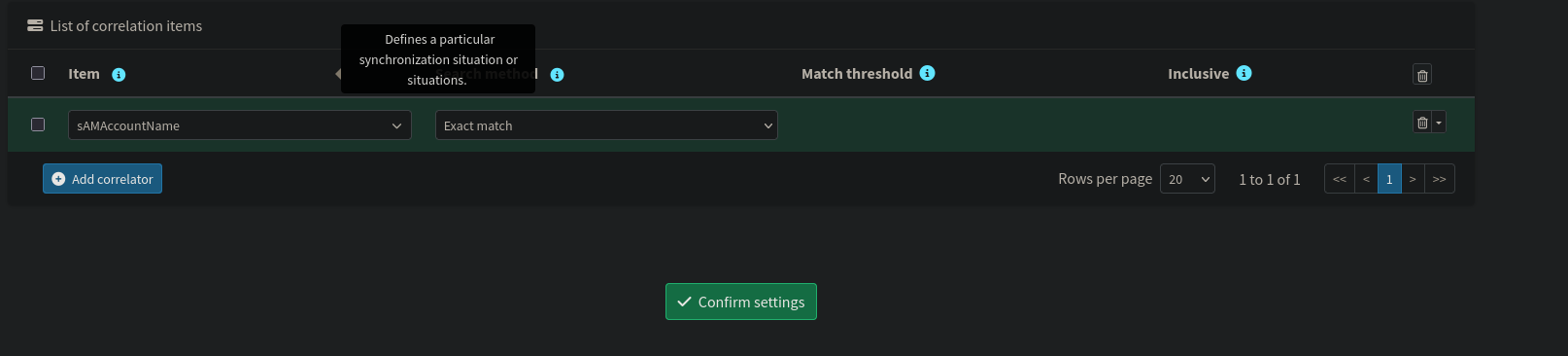
Correlation on the AD side uses sAMAccountName with exact match, mapped against the midPoint name attribute. This prevents duplicate AD accounts if a user already exists in the directory.
Synchronization Reactions
The same four reactions are configured on the AD connector, handling the full lifecycle for accounts in Active Directory.
Credentials
This section allows for automatic password generation for Active Directory users. Setting the expression to Generate instructs midPoint to produce a random password on account creation that satisfies any complexity policy defined in the credential policy configuration. It is worth noting that generated passwords have no delivery mechanism configured in this lab; there are no notification handlers or email templates wired up to communicate the credential to the new user. In a production environment this would be handled by midPoint's notification subsystem, but for lab purposes the generated password is visible in the midPoint repository and can be read directly from the account object if needed.
Role Creation
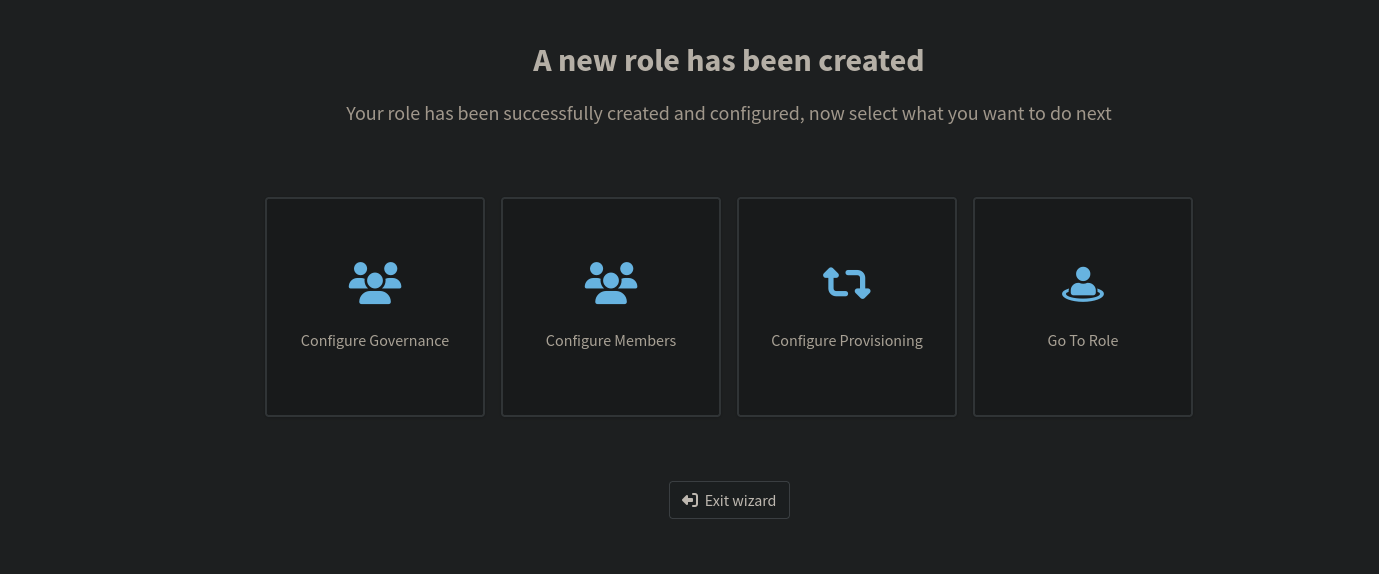
Before the auto-assignment mapping can reference the AD provisioning role, the role itself must exist.
The AD User role acts as an abstraction layer between business assignments and technical provisioning. Rather than creating Active Directory accounts directly from synchronization logic, users are assigned a role. That role contains a construction which defines the account that should exist on the AD resource. When assigned, midPoint generates a projection representing the target account and passes it through the Clockwork engine for evaluation and provisioning. This separation allows the same business role assignment model to scale across multiple connected resources.
Navigate to Roles → New role → Application Role. Skip the application selection step as no applications are defined at this stage, and give the role a meaningful name such as AD Provisioning Role.
From the role editor, go to Configure provisioning and select the AD resource. Set the object type to AD Account, Kind Account, and Intent default. This tells midPoint that inducing this role onto a user should result in an account being created in Active Directory under the Lab Users OU.
Skip the membership and mappings steps entirely. Attribute provisioning is handled by the outbound mappings already defined at the resource level, so no additional configuration is needed here. Save the role and note the OID assigned to it, as this value is referenced directly in the inbound mapping expression covered in the previous section.

Object Templates
midPoint's documentation describes object templates as the standard mechanism for exactly this kind of system-wide logic. Applied to all UserType objects, with a mapping that targets assignment and a reference wiring it to the resources or objects it should apply to, which is the design this lab started with, and a template object was built along the way.
That template still exists in the repository, but it isn't linked to anything: every documented way of making the link, from <inducement> inside the template, objectTemplateRef on the resource's object type, or objectPolicyConfiguration in system configuration, led to a failed schema validation in 4.10.1. Rather than chase a schema mismatch further, the role auto-assignment moved entirely into the CSV resource's own schema handling as the assign-ad-role inbound mapping described above. The orphaned template object is harmless and could be deleted, but it's left in place as a record of the path that was tried.
Reconciliation Tasks
One reconciliation task drives the entire automated pipeline:
- HR Reconciliation: polls the CSV file and processes any additions, modifications, or removals against the midPoint user repository. This is the primary lifecycle driver: new CSV rows become midPoint users, modified rows trigger attribute synchronization, and removed rows propagate as user deletions or deactivations.
AD provisioning is not driven by a separate reconciliation task. It is a downstream consequence of the HR reconciliation: when the assign-ad-role inbound mapping on employeeNumber fires, it places the AD provisioning role into the user's assignment container. Clockwork picks that up within the same execution cycle, computes the AD projection, and issues the provisioning operation through the ICF connector. The AD side is fully driven by what the HR reconciliation produces, not by an independent scan of the directory.
In a production environment the HR reconciliation task would run on a tight interval. In the lab it is triggered manually because win-srv01 does not start automatically; the Windows Server is kept offline during debugging to conserve RAM, and having the task fire while the server is unreachable generates needless connector failures and reconciliation errors.
With that, the heart of the identity infrastructure is configured, allowing for seamless, automated lifecycle activities.
Active Directory
While I'm very comfortable with the UI of Active Directory, in the spirit of this lab, I wanted to use PowerShell so that it can be recreated purely in code. This included creating the two service accounts, the lab users OU, and the delegated access controls. Unfortunately, PowerShell does not have a built-in command to set AD delegations, so I had to drop down to the raw .NET. I would recommend going through the wizard by right clicking the OU, and delegating control there.
Even though this is a lab environment, the importance of documentation cannot be understated, hence including a description. Furthermore, the service account's password does not expire and cannot be changed. This is by design, since I am not too worried about password cracking in a fully offline environment, especially because the future of this lab involves tools to address this specifically.
The access rules for delegating the permissions do overlap with each other, but for clarity, I have spread them out in a way where each line corresponds to each delegated access condition. It does not affect the functionality, but I wanted to add a note of it since it's non-optimal code.
Keycloak
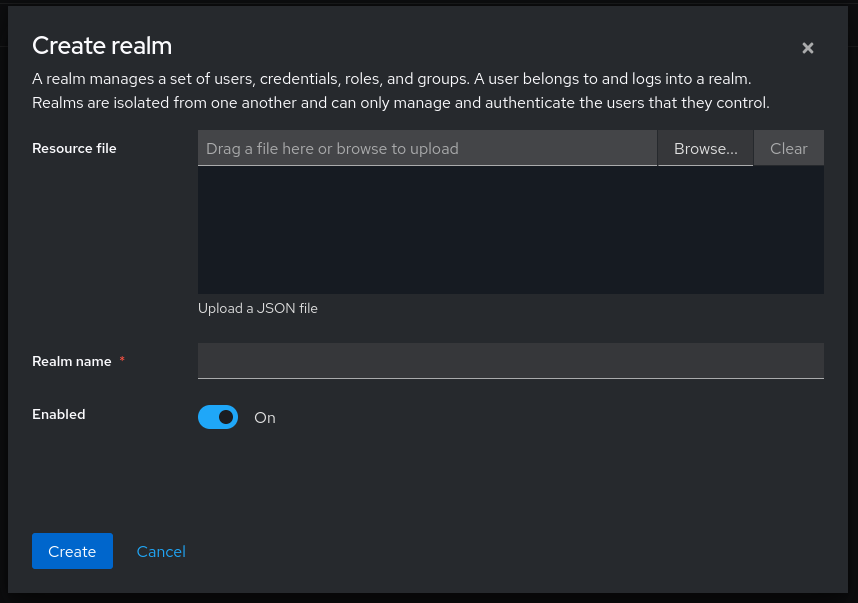
Keycloak starts with a built in realm, which are isolated identity domains, called master. It should be reserved for Keycloak administering, and while it can be used, best practice is to leave it untouched. Therefore, the first step is to create a new realm. Fittingly, the lab is named lab. If I ever introduce guest users, or some other "organization" into the lab, I would create a separate realm for them here. This ensures complete isolation between identity domains. Users, roles, clients, and authentication flows are all scoped to their realm, so a guest user in one realm has no visibility into or access to anything in another unless specifically granted. Simply click realms, then new realm. JSON can be imported, but I wanted to start fresh with the UI first.
Creating OIDC Client
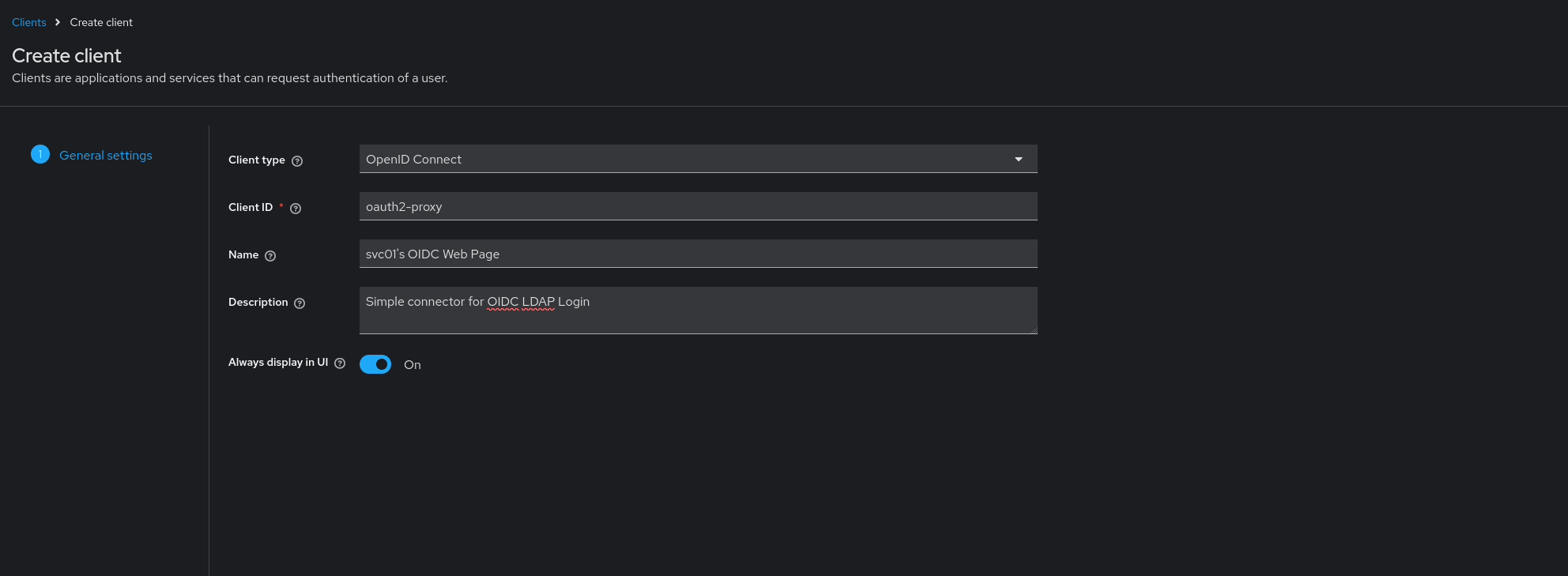
Create a new client with the client ID oauth2-proxy. Standard Flow should be enabled as this is a server-side application using the authorization code flow. Set the Root URL, Home URL, and Valid Redirect URIs to https://whoami.lab.internal, with the redirect URI including a wildcard to cover the oauth2-proxy callback path. Set Web Origins to the same base URL to handle CORS correctly.
Under Capability Config, enable Client Authentication to make this a confidential client, and enable Authorization Services. Once saved, navigate to the Credentials tab and copy the generated client secret into the single sign on application configuration.
LDAP Connector
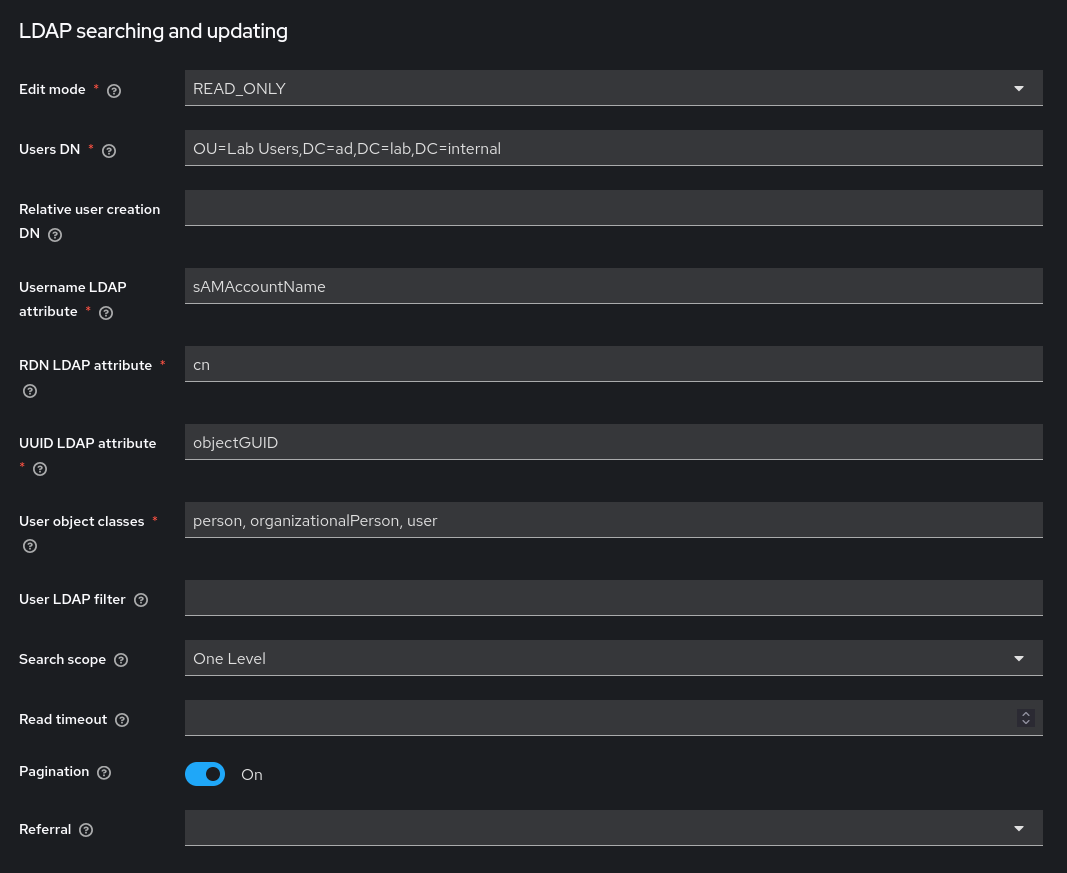
The LDAP connector configuration will vary depending on setup. In this system, a dedicated OU for lab users was used, so the Users DN is OU=Lab Users,DC=ad,DC=lab,DC=internal and the Bind DN is CN=svc-keycloak,CN=Users,DC=ad,DC=lab,DC=internal. Enter the service account password and use the Test Connection and Test Authentication buttons to verify before saving.
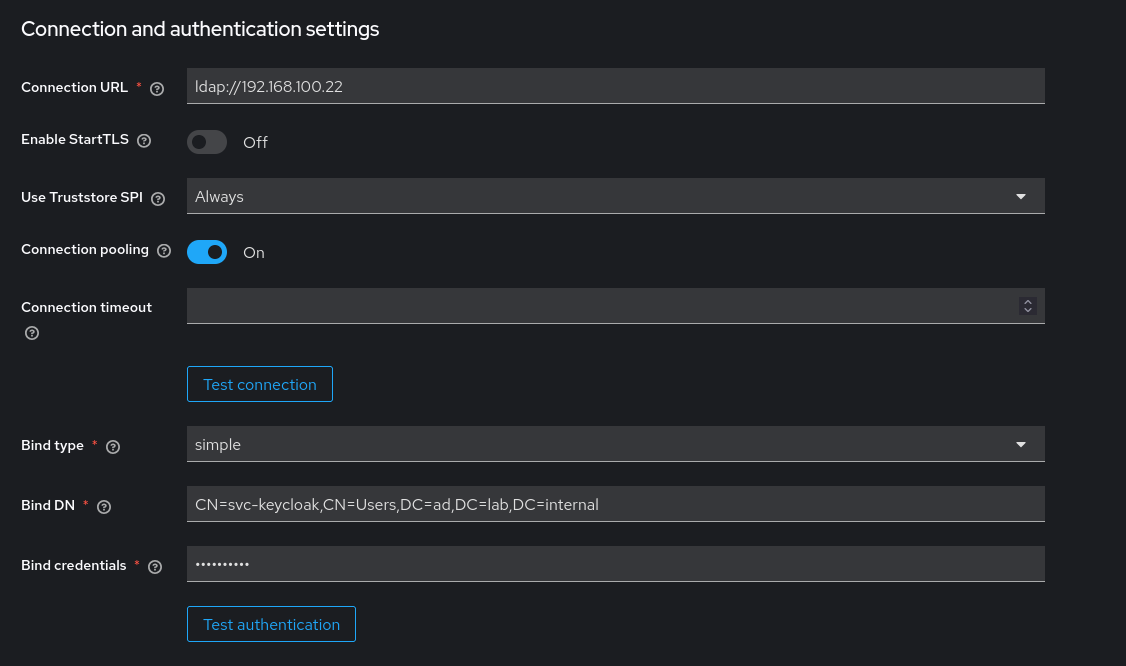
Set Edit Mode to READ_ONLY unless it is necessary for Keycloak to be able to perform AD administration. In this lab midPoint will be handling all the writing to Active Directory. The Username LDAP attribute should be sAMAccountName for AD, and Search Scope to One Level if all users are in a single OU.
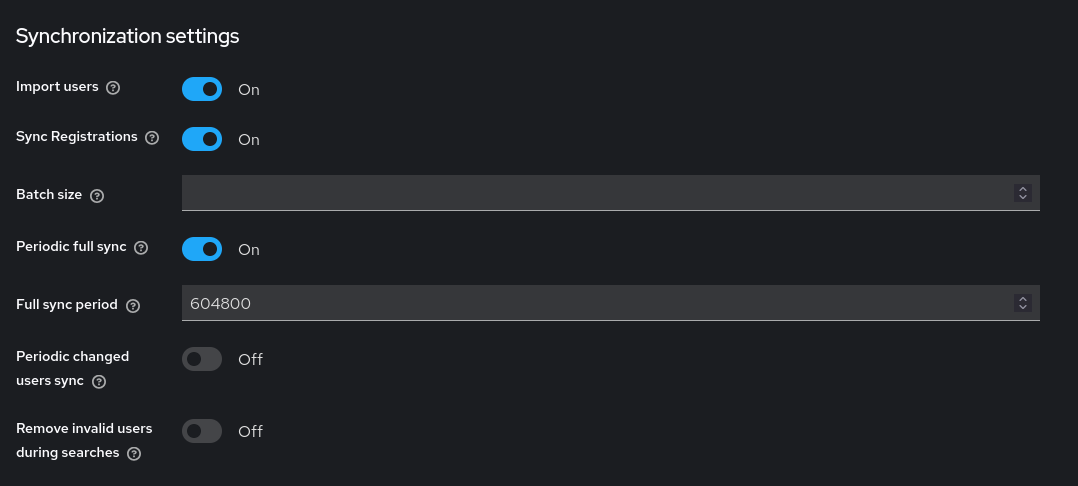
Periodic full sync is enabled with a 7-day period (604800 seconds). Periodic changed users sync is left off since the full sync is sufficient for a lab environment.
Attribute-Based Access Control
This is the most involved part of the Keycloak configuration, touching user federation, client scopes, and token mappers. The goal is to read the department attribute from Active Directory, surface it in the JWT as a groups claim, and let oauth2-proxy use that claim to gate access to downstream applications. The steps must be completed in order, as each builds on the last.
Map the AD Attribute into Keycloak
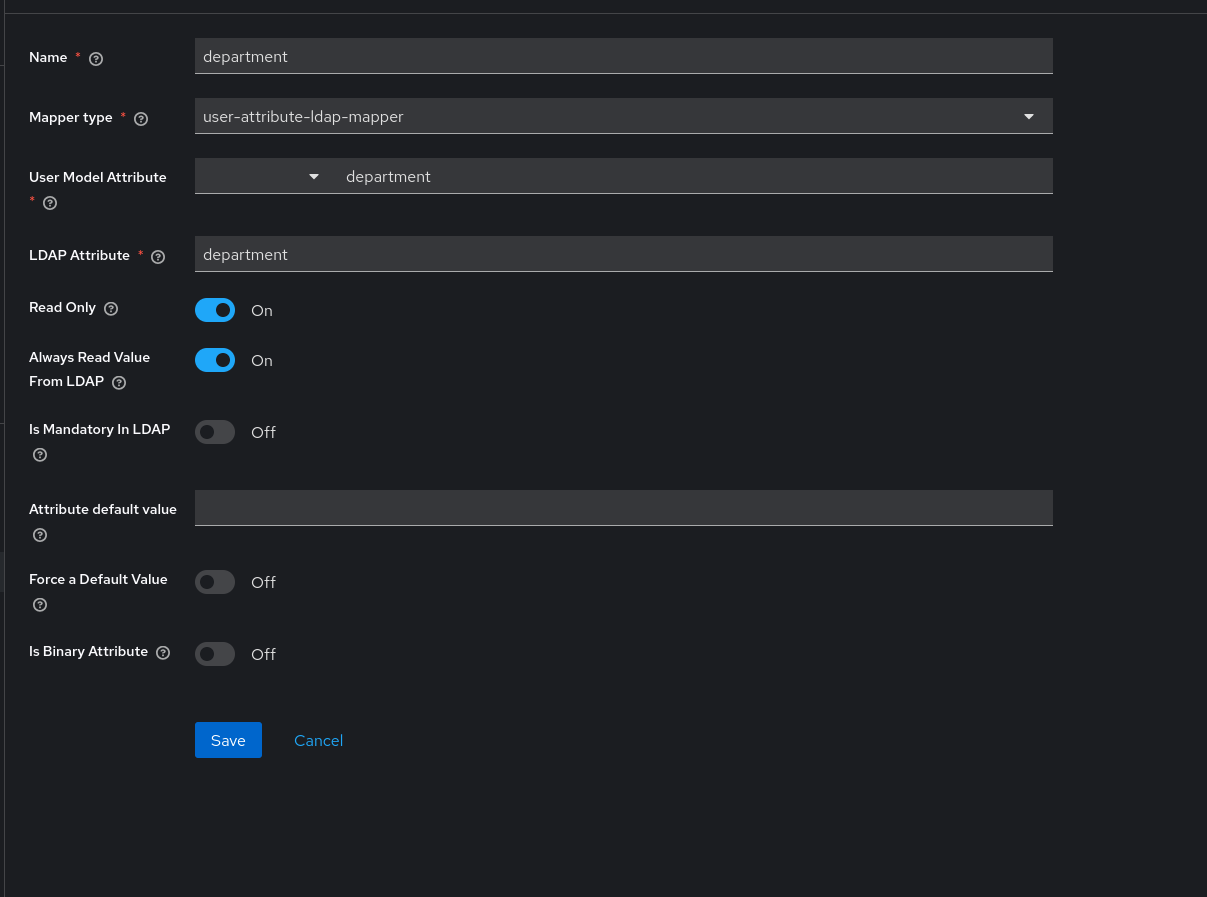
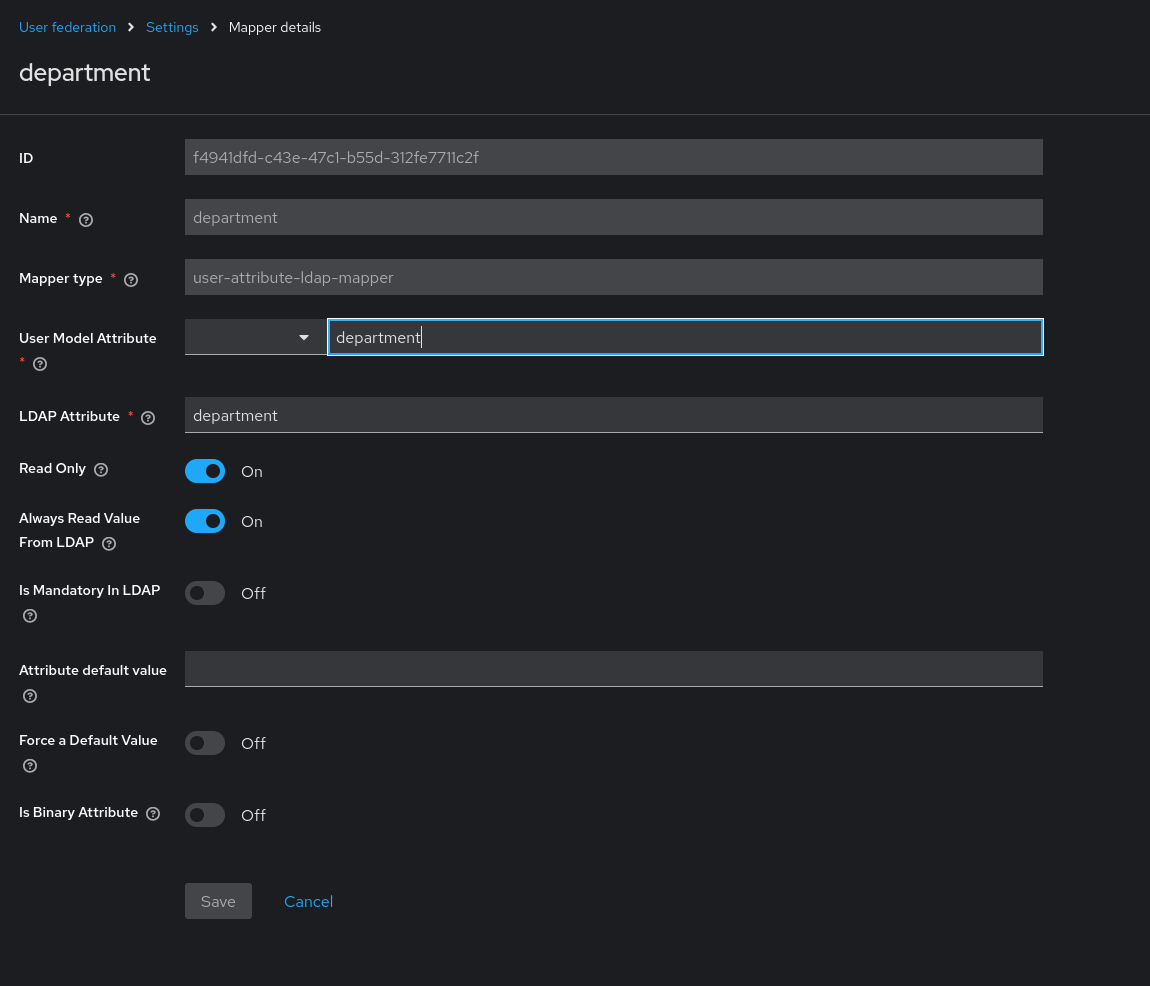
The department attribute exists in Active Directory but is not synced by default. Navigate to User Federation → [LDAP provider] → Mappers → Add mapper and create a user-attribute-ldap-mapper with the following settings:
| Setting | Value |
|---|---|
| LDAP Attribute | department |
| User Model Attribute | department |
| Read Only | Enabled |
| Always Read Value From LDAP | Enabled |
| Is Mandatory In LDAP | Disabled |
After saving, trigger a full user sync and verify the attribute is populated by checking any synced user's Attributes tab.
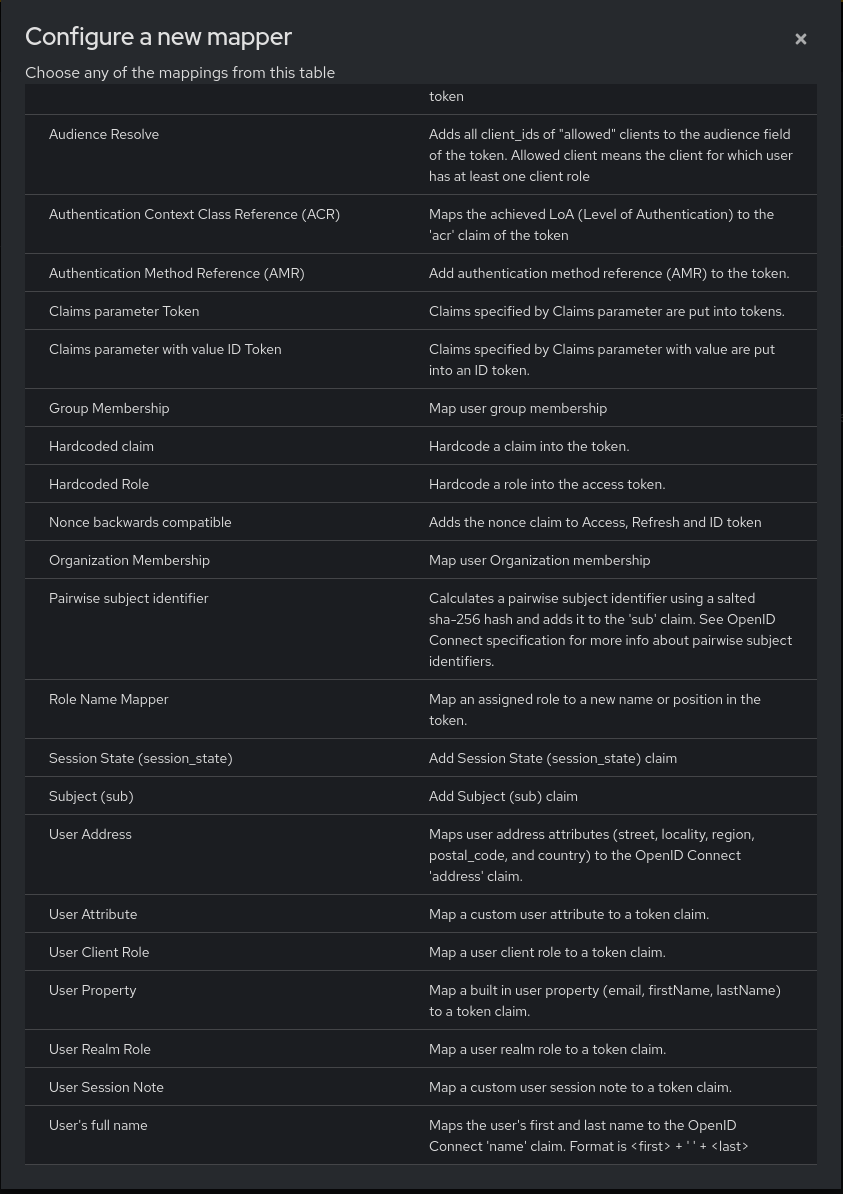
Exposing the Attribute as a Token Claim
In the oauth2-proxy client's dedicated scope, add a User Attribute mapper that maps the department user attribute to a token claim also named department. This doesn't drive access control directly, but makes the raw AD attribute visible in the decoded JWT for debugging and for any future clients that need it.
Creation of the Groups Client Scope
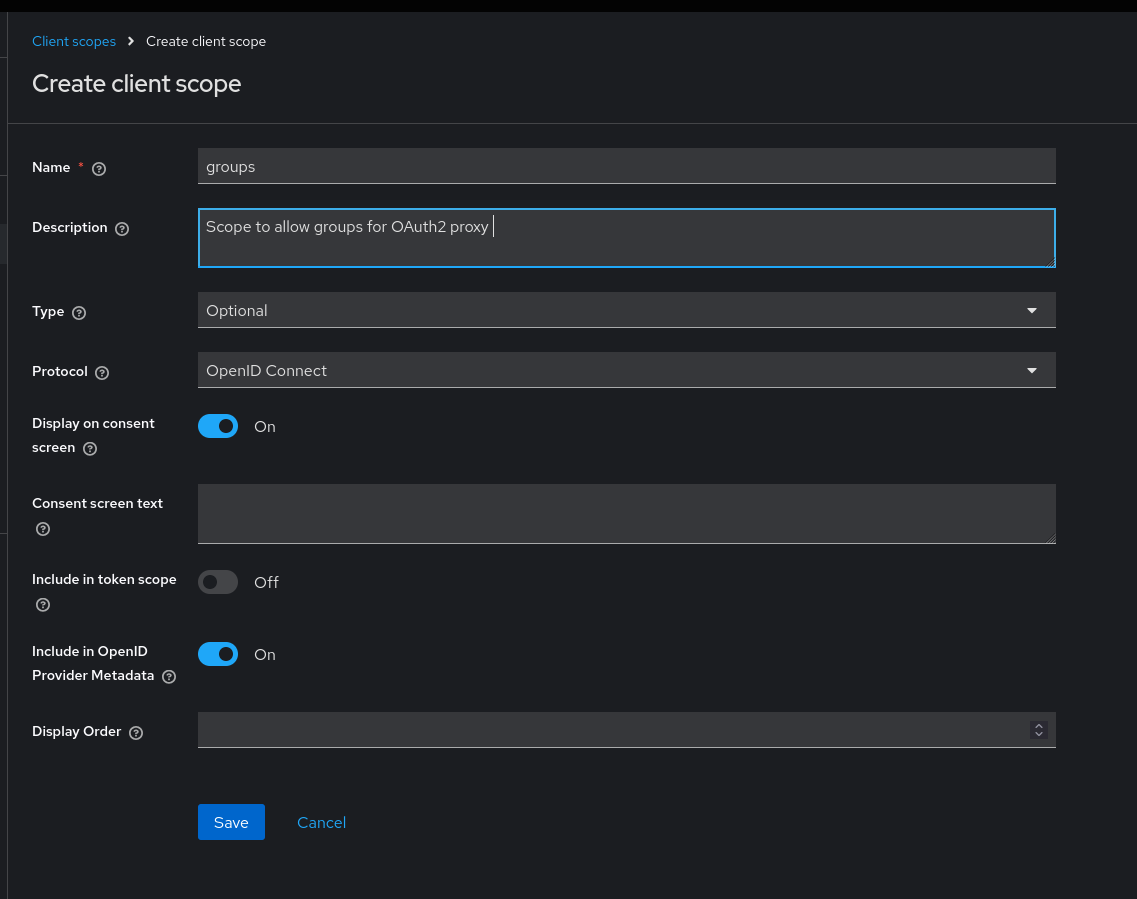
oauth2-proxy requests a groups scope during the OIDC flow. Keycloak will reject the request with invalid_scope if no matching client scope exists. Create a new client scope named groups with protocol OpenID Connect, then add it to the oauth2-proxy client as an optional scope.
Mapping Department into the Groups Claim
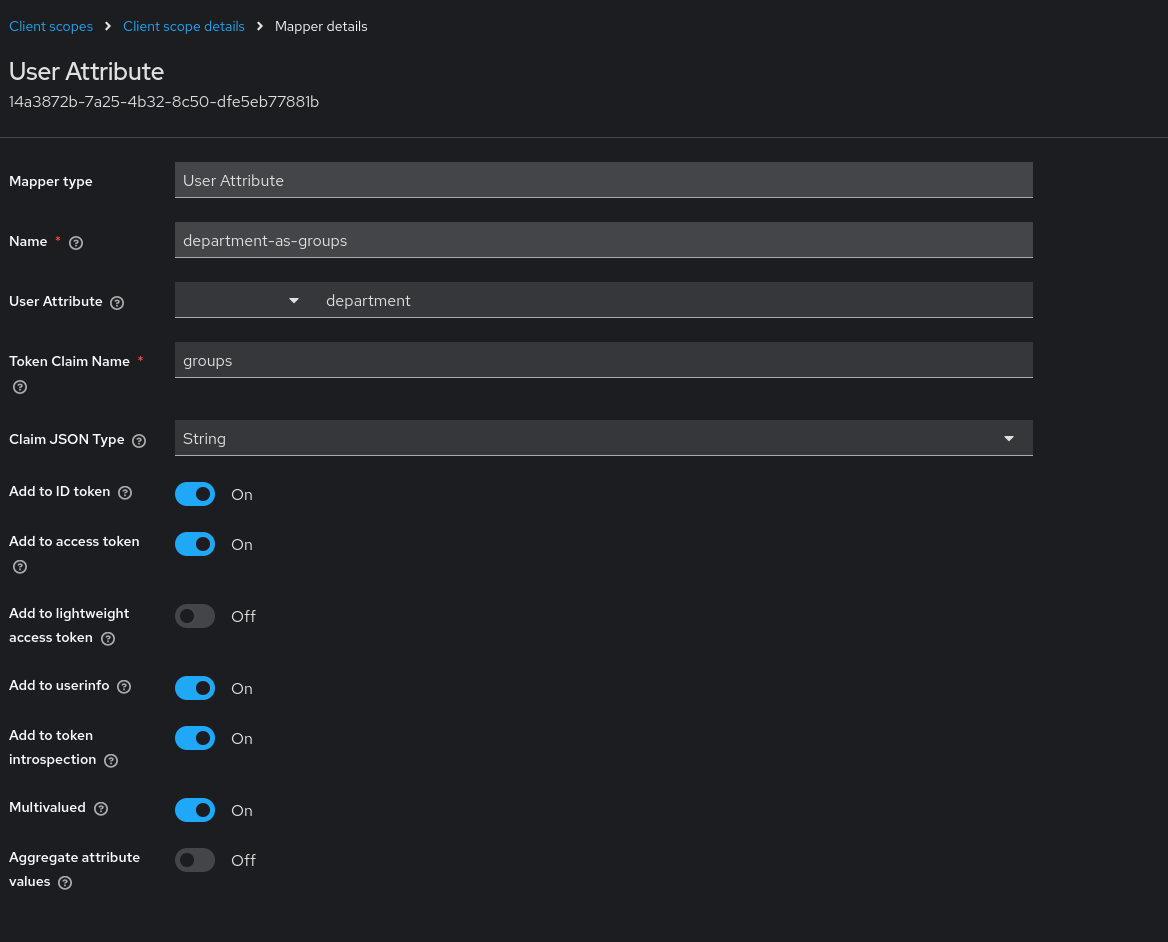
Rather than adding the mapper directly to the client, add a User Attribute mapper inside the groups client scope itself: Client Scopes → groups → Mappers → Add mapper. Map the department user attribute to a claim named groups with Multivalued enabled.
Placing the mapper here keeps it logically scoped to the groups claim. When oauth2-proxy requests the groups scope, Keycloak knows exactly what to populate it with.
With these four steps in place, a user in the Engineering department receives a token containing groups: ["Engineering"]. oauth2-proxy validates that claim before proxying the request to the upstream application — any user whose department doesn't match is denied at the proxy, with no request reaching the application.
Single Sign On Application
Navigating to https://whoami.lab.internal/ redirects to Keycloak for authentication. Users in the Engineering department complete the flow and land on the whoami echo page; anyone else is denied at the proxy. The echoed headers confirm the full pipeline is functioning: X-Forwarded-Groups carries the Engineering claim, X-Forwarded-Email and X-Forwarded-User reflect the AD identity midPoint provisioned, and the decoded access token in Appendix C shows the complete claim set. If anything in the pipeline has failed, it surfaces here.
The identity pipeline is complete, with automatic Identity Governance and Administration, including access creation, modification, and deletion triggered from upstream source-of-truth events, with periodic access certifications to ensure orphans are minimized and segregation of duties enforced. These inputs are given to the Identity Federation Provider to perform attribute-based access control and communicate with an OIDC application for OAuth2 single-sign-on.
Appendix D — OIDC Verification
Debugging and Troubleshooting
The two biggest issues that crept up constantly throughout the lab were permissions issues and race conditions. Whether it was the Caddy not having the permission to read the certificate, or midPoint failing to reconcile because the object template would attempt to concatenate the first and last name to create a full name before the population of those fields within the shadow, nothing about this lab was truly trivial. Being able to access the underlying infrastructure, and connect to the shell as whichever user I deemed necessary to parse the logs for errors, warnings, or complete boot failures was nothing short of necessary for a project of this scope. Issues could be quickly caught and tracked by journalctl -b -p err mostly, but midPoint, since it was running under PodMan, would not spit system level errors, so instead I would run journalctl -b -u | grep -i -A 3 error, searching for specific strings containing either error, or whatever I deemed necessary.
Below is a table of many of the issues I ran into architecting this system.
🛠️ Infrastructure & Core Networking
| Situation | Task | Action | Result |
|---|---|---|---|
| DNS: Bringing up the MidPoint and BloodHound containers, both of which depend on internal DNS resolution. | Containers failed to start, throwing Temporary failure in name resolution — nothing was listening on port 53. | Diagnosed that services.samba only provides file-sharing and never provisions an AD DC/DNS service; replaced it with services.unbound as an authoritative resolver for lab.internal and ad.lab.internal. | Containers resolved internal hostnames and started cleanly. |
DNS, Host: After container DNS was fixed, the host browser still couldn't reach lab.internal services. | Host resolution returned NXDOMAIN for lab.internal despite working container DNS. | Found NetworkManager was prepending the home router (192.168.1.254) into /etc/resolv.conf; set networking.networkmanager.dns = "none" to lock down resolv.conf. | Host browser correctly resolved all lab.internal services. |
| Routing: Containers had working DNS but needed to reach external networks. | Containers could resolve names but could not route traffic to external addresses (e.g., 1.1.1.1). | Diagnosed missing default gateway declarations preventing containers from finding the host bridge; added networking.defaultGateway = "192.168.100.1" to all container definitions. | Containers routed outbound traffic through the host bridge successfully. |
Routing, NAT: svc01 (Caddy) and tp01 (Teleport) needed outbound internet access. | Outbound traffic from both hosts dropped silently before reaching the internet. | Found both hosts were missing from the host's nftables NAT masquerade set; added svc01 and tp01 explicitly in networking.nix. | Both hosts gained working outbound internet connectivity. |
📦 Podman & Container Runtimes (Inside systemd-nspawn)
| Situation | Task | Action | Result |
|---|---|---|---|
Storage Driver: Starting Podman inside the bh01 and mp01 nspawn containers. | Podman crashed on startup with conmon: Failed to create container. | Diagnosed that Podman's default overlay driver fails when nested on the host's existing overlayfs; set virtualisation.containers.storage.settings.storage.driver = "vfs" and ran podman system reset --force. | Podman containers in bh01 and mp01 started reliably. |
Kernel Capabilities: Configuring Podman's netavark network backend inside nspawn. | Network setup failed with crun: bpf create: Operation not permitted. | Identified that netavark's eBPF filtering requires CAP_BPF and CAP_NET_ADMIN, which systemd-nspawn drops by default; appended both capabilities to the container's extraFlags in containers.nix. | Netavark network setup completed without permission errors. |
| Air-gapped Deployment: Containers run in an isolated network segment with no default registry egress. | Podman timed out trying to pull images from public registries on startup. | Used pkgs.dockerTools.pullImage to fetch and pin images by digest at build time, loading them directly from the Nix store. | Containers started using pre-pinned images with no runtime registry dependency. |
Bind Mounts: Standing up bh01 with a host-mounted data directory. | bh01 failed with Failed to clone /mnt/wd_blue/... No such file or directory. | Found the host bind-mount target didn't exist; created it with mkdir -p /mnt/wd_blue/containers/bh01. | bh01 mounted the host directory and started successfully. |
🔐 Security, PKI, & Identity Providers (IdP)
| Situation | Task | Action | Result |
|---|---|---|---|
| step-ca: Deploying a private step-ca certificate authority. | step-ca crashed repeatedly with permission denied. | Found the NixOS activation script built /var/lib/step-ca as root:root, blocking the unprivileged step-ca user; declared a static user, set DynamicUser = false, and added an ExecStartPre chown step running as root. | step-ca ran cleanly under its intended unprivileged user. |
Firewalls: svc01 needed to request ACME certificates from step-ca on the host. | ACME validation requests from svc01 to step-ca were dropped by the host firewall. | Found the default NixOS firewall input chain evaluated first and dropped traffic before the custom rule could run; replaced the custom chain with networking.firewall.trustedInterfaces = [ "br-lab" ]. | ACME validation succeeded and certificates were issued to svc01. |
| Virtualisation: Creating a Windows Server VM via KVM on the lab bridge. | VM creation failed with access denied by acl file from qemu-bridge-helper. | Identified that the bridge helper lacked permission to attach a tap interface to br-lab; added virtualisation.libvirtd.allowedBridges = [ "br-lab" ]. | The Windows Server VM was created and attached to br-lab. |
| Keycloak Admin: Bootstrapping admin access on Keycloak 26. | Admin login failed silently despite environment variables matching documentation. | Discovered Keycloak 26 silently renamed KEYCLOAK_ADMIN to KC_BOOTSTRAP_ADMIN_USERNAME; renamed the variables and dropped/recreated the PostgreSQL DB to retrigger bootstrap. | Admin console login succeeded with the new bootstrap credentials. |
| Keycloak DB Init: Keycloak's systemd-managed database initialization. | The DB init script crashed with a "Protocol error". | Found the NixOS module's use of systemd LoadCredential requires CAP_SYS_ADMIN to mount its private tmpfs; granted CAP_SYS_ADMIN to idp01 via extraFlags and force-disabled keycloakPostgreSQLInit with lib.mkForce. | DB initialization completed and Keycloak started normally. |
| LDAP Federation: Federating Keycloak with AD over plaintext LDAP. | Users couldn't authenticate via LDAP federation, returning error 49 / data 52e. | Found the Username LDAP Attribute was mapped to cn instead of sAMAccountName; remapped it and re-ran a full user synchronization. | AD users authenticated successfully through federated LDAP. |
| oauth2-proxy: Downstream apps authenticating via Keycloak/AD identities. | Proxies returned 500 errors: email in id_token isn't verified. | Found AD users lacked a mail attribute and Keycloak's LDAP federation didn't trust the email source; remapped the email mapper to userPrincipalName and enabled Trust Email. | Downstream apps accepted AD/Keycloak identities without email-verification errors. |
🏛️ Identity Governance and Administration (IGA) - MidPoint
| Situation | Task | Action | Result |
|---|---|---|---|
| DB Authentication: First-time PostgreSQL connection setup for midPoint. | MidPoint couldn't connect to PostgreSQL over TCP (localhost:5432). | Found NixOS ensureUsers creates a passwordless role, but PostgreSQL requires a password for TCP auth; overrode pg_hba.conf to force trust auth for loopback (127.0.0.1/32). | MidPoint connected to PostgreSQL over TCP. |
| DB Extensions: Initial database schema bootstrap. | DB initialization crashed immediately on a missing m_global_metadata table. | Found the schema requires pg_trgm and intarray extensions that the midpoint DB owner can't create; added an idempotent oneshot systemd service running as the postgres superuser to pre-create both extensions. | Schema initialization passed the m_global_metadata step. |
| DB Schema Search: Schema generation completed but the app couldn't find its tables. | MidPoint tables existed but the container still couldn't find them. | Found tables landed in the postgres schema due to the superuser's default search_path; reapplied schemas with SET search_path TO public; and -v ON_ERROR_STOP=1. | MidPoint located its tables in the public schema. |
| DB Object Owner: Tables now visible, but queries still failing. | The app threw permission denied querying public schema tables. | Found the init script ran as postgres, leaving tables owned by the superuser; ran global schema grants plus ALTER DEFAULT PRIVILEGES IN SCHEMA public GRANT ALL ON TABLES TO midpoint. | MidPoint queries succeeded without permission errors. |
| DB Audit Trails: MidPoint initialized cleanly but threw runtime errors. | Continuous exceptions writing to ma_audit_event. | Found only postgres.sql was executed; postgres-audit.sql and postgres-quartz.sql were skipped; consolidated all three into the init routine. | Audit and Quartz writes completed without runtime exceptions. |
| Data Persistence: Admin credentials/config not surviving restarts. | Admin passwords and configs reverted or broke on every container restart. | Found midPoint's internal encryption keystore (keystore.jceks) was ephemeral inside the container; bind-mounted /opt/midpoint/var to host storage. | Admin credentials and configuration persisted across container restarts. |
LDAPS Trust (mp01): Testing the winsvr01 AD Resource connection over LDAPS after importing the step-ca root into the container's Java cacerts. | Connection test failed with InvalidAlgorithmParameterException: trustAnchors parameter must be non-empty and a connector timeout to win-srv01.ad.lab.internal:636. | Found midPoint's JVM is launched with -Djavax.net.ssl.trustStore pointed at its own keystore.jceks (not cacerts), which ships with zero CA entries; removed the now-ineffective cacerts import step and added an idempotent midpoint-truststore-init oneshot service that waits for keystore.jceks to be created, imports the step-ca root via keytool, and restarts podman-midpoint once. | LDAPS handshake to the AD resource completed with no further trust errors. |
| CSV → AD Role Auto-Assignment (midPoint 4.10.1): Building the CSV → user → AD account → Keycloak → OIDC pipeline; every CSV-imported user needed an AD role assigned automatically. | Every conventional approach failed schema validation: <inducement> in an Object Template, <objectTemplateRef> on the resource, <objectPolicyConfiguration> in System Configuration, and a standalone <mapping> in objectType all returned "no definition" errors in 4.10.1. | Added a second <inbound> mapping on the existing employeeNumber attribute (guaranteed present on every CSV user), using a constant <value> expression targeting the assignment path — the only mapping path that passed schema validation. | Role assignment fired for every CSV-imported user on reconciliation, with the midPoint admin naturally excluded (no CSV account). |
| AD/PKI Integration: Integrating the Windows Server 2022 DC with midPoint over LDAPS after plaintext LDAP (389) was already working. | LDAPS (636) failed completely - TLS handshake produced zero bytes before a TCP RST, with Schannel logging Event ID 36886 (No suitable default server credential exists). | After hours of cert store, EKU, ACL, and CNG checks all passed, ran [System.Net.Dns]::GetHostEntry('localhost').HostName and discovered the DC's real hostname (WIN-Q59220PL1QO) didn't match the win-srv01 SAN on every issued certificate; renamed the DC to win-srv01 to match existing DNS, certs, and config. | LDAPS came up on the first attempt after the rename and reboot. |
Future Considerations
Artificial Intelligence and Identity as Code are the next steps of this lab. If you look at the GitHub, you will see three containers that are not mentioned anywhere here, ai01, hv01, and hb01. These are Qwen2.5-3B quantized Q4_K_M, served over an Ollama container, HashiCorp Vault and HashiCorp Boundary. With these three containers, and likely a couple more containerized virtual machines, I will be working on creating a proof-of-concept, showing where I personally see AI fitting into identity and access management. The high-level overview is that dynamic credentials are created by the vault, and injected into every SSH connection made, where my local LLM will analyze the logs, and provide a risk score for every connection, where an analyst can determine the next steps. In my opinion, this allows for each participant to shine - the LLM can performed constrained analysis based on rules and metrics, the analyst can perform more abstract critical thinking, and the engineer can architect and maintain the system.
The new policies, whether Keycloak or HashiCorp, will be done with Terraform to further the goal of creating a declaritive infrastructure, and available at https://joshcain.is-a.dev/ai-lab
Closing Remarks
This lab is the culmination of not only over one hundred hours of work, but also my experience within the identity and access management field and systems engineering in general. While not finished, it entirely represents my holistic point-of-view when looking at technical architecture, managing everything from the network bridges to the protocols used for communicating authentication and authorization. I'm quite fortunate to be working in a field that is ever expanding, and filled with innovation. Getting the opportunity to deep-dive into the backend of identity governance, identity federation, and the protocols surrounding it like LDAPS, OIDC, ACME, and TLS, all while having complete ownership over each aspect has really emboldened me to continue deep diving into the field, both closed and open-source software, from Saviynt and Ping Identity, to Wazuh and OpenLDAP. If anything in this write-up interests you, the footer contains my LinkedIn, email, or GitHub, please feel free to reach out, I'd be happy to elaborate on design decisions, or discuss the future of identity and access management.
Appendix A - Certificate Generation
Creating the Password File
sudo mkdir -p /var/lib/step-ca/secrets
echo 'YourCAPassword' | sudo tee /var/lib/step-ca/secrets/password
sudo chmod 600 /var/lib/step-ca/secrets/password
Bootstrap the PKI
sudo STEPPATH=/var/lib/step-ca step ca init \
  --name "Lab Internal CA" \
  --dns "pki.lab.internal" \
  --address "0.0.0.0:9000" \
  --provisioner "admin@lab.internal" \
  --password-file /var/lib/step-ca/secrets/password \
  --provisioner-password-file /var/lib/step-ca/secrets/password
Set Ownership and Start the Service
sudo chown -R step-ca:step-ca /var/lib/step-ca
sudo chmod 644 /var/lib/step-ca/certs/root_ca.crt
sudo systemctl start step-ca
sudo systemctl status step-ca
Trust the Root CA on the Host
step ca bootstrap \
  --ca-url https://pki.lab.internal:9000 \
  --fingerprint $(step certificate fingerprint /var/lib/step-ca/certs/root_ca.crt)
Optional — Issue a Certificate Manually
step ca certificate whoami.lab.internal whoami.crt whoami.key \
  --ca-url https://pki.lab.internal:9000 \
  --root /var/lib/step-ca/certs/root_ca.crt
Creating the Certs for LDAPS
curl -o root_ca.crt https://pki.lab.internal:9000/roots.pem
step ca certificate win-srv01.ad.lab.internal win-srv01.crt win-srv01.key \
  --ca-url https://pki.lab.internal:9000 \
  --root root_ca.crt \
  --provisioner admin@lab.internal
sudo cat /var/lib/step-ca/certs/intermediate_ca.crt > intermediate_ca.crt
step certificate p12 win-srv01.p12 win-srv01.crt win-srv01.key --ca intermediate_ca.crt
Importing the certificates
Import-Certificate -FilePath .\win-srv01.p12 -CertStoreLocation Cert:\LocalMachine\Root
Import-Certificate -FilePath .\root_ca.crt -CertStoreLocation Cert:\LocalMachine\Root
Import-Certificate -FilePath .\intermediate_ca.crt -CertStoreLocation Cert:\LocalMachine\CA
Test-NetConnection win-srv01.ad.lab.internal -Port 636
Appendix B - midPoint XML
<attribute id="10">
    <ref>ri:employeeNumber</ref>
    <inbound id="11">
        <name>employeeNumber</name>
        <strength>strong</strength>
        <target>
            <path>employeeNumber</path>
        </target>
    </inbound>
    <!-- New code starts here -->
    <inbound id="33">
        <name>assign-ad-role</name>
        <strength>strong</strength>
        <expression>
            <value>
                <targetRef oid="7c6b5a0a-86c1-4d20-ae5a-0bdf0f0b84d2" type="c:RoleType"/>
            </value>
        </expression>
        <target>
            <path>assignment</path>
        </target>
    </inbound>
    <!-- Ends here -->
</attribute>
Appendix C - PowerShell
midPoint Service Account
New-ADUser `
    -Name "svc-midpoint" `
    -SamAccountName "svc-midpoint" `
    -UserPrincipalName "svc-midpoint@ad.lab.internal" `
    -Description "midPoint JML Service Account" `
    -Enabled $true `
    -PasswordNeverExpires $true `
    -CannotChangePassword $true `
    -AccountPassword (ConvertTo-SecureString "InsertAPasswordHere" -AsPlainText -Force)
midPoint Delegated Permissions
$ouPath = "OU=Lab Users,DC=ad,DC=lab,DC=internal"
$acl = Get-Acl "AD:\$ouPath"
$sid = (Get-ADUser "svc-midpoint").SID

$userClass     = [GUID]"bf967aba-0de6-11d0-a285-00aa003049e2"
$groupClass    = [GUID]"bf967a9c-0de6-11d0-a285-00aa003049e2"
$allObjects    = [GUID]"00000000-0000-0000-0000-000000000000"
$resetPassword = [GUID]"00299570-246d-11d0-a768-00aa006e0529"
$memberAttr    = [GUID]"bf9679c0-0de6-11d0-a285-00aa003049e2"
$pwdLastSet    = [GUID]"bf967a0a-0de6-11d0-a285-00aa003049e2"

$allow = [System.Security.AccessControl.AccessControlType]::Allow
$desc  = [System.DirectoryServices.ActiveDirectorySecurityInheritance]::Descendents
$all   = [System.DirectoryServices.ActiveDirectorySecurityInheritance]::All

# Create/Delete user accounts
$acl.AddAccessRule((New-Object System.DirectoryServices.ActiveDirectoryAccessRule($sid, "CreateChild,DeleteChild", $allow, $userClass, $all, $allObjects)))

# Create/Delete groups
$acl.AddAccessRule((New-Object System.DirectoryServices.ActiveDirectoryAccessRule($sid, "CreateChild,DeleteChild", $allow, $groupClass, $all, $allObjects)))

# Read all user information + manage user accounts
$acl.AddAccessRule((New-Object System.DirectoryServices.ActiveDirectoryAccessRule($sid, "ReadProperty,WriteProperty", $allow, $allObjects, $desc, $userClass)))

# Read + manage groups
$acl.AddAccessRule((New-Object System.DirectoryServices.ActiveDirectoryAccessRule($sid, "ReadProperty,WriteProperty", $allow, $allObjects, $desc, $groupClass)))

# Modify group membership
$acl.AddAccessRule((New-Object System.DirectoryServices.ActiveDirectoryAccessRule($sid, "WriteProperty", $allow, $memberAttr, $desc, $groupClass)))

# Reset user passwords
$acl.AddAccessRule((New-Object System.DirectoryServices.ActiveDirectoryAccessRule($sid, "ExtendedRight", $allow, $resetPassword, $desc, $userClass)))

# Force password change on next logon (pwdLastSet)
$acl.AddAccessRule((New-Object System.DirectoryServices.ActiveDirectoryAccessRule($sid, "WriteProperty", $allow, $pwdLastSet, $desc, $userClass)))

Set-Acl "AD:\$ouPath" $acl
Keycloak Service Account
New-ADUser `
    -Name "svc-keycloak" `
    -SamAccountName "svc-keycloak" `
    -UserPrincipalName "svc-keycloak@ad.lab.internal" `
    -Description "Keycloak OIDC Federation Service Account" `
    -Enabled $true `
    -PasswordNeverExpires $true `
    -CannotChangePassword $true `
    -AccountPassword (ConvertTo-SecureString "InsertAPasswordHere" -AsPlainText -Force)
Creating the Lab Users OU
New-ADOrganizationalUnit `
    -Name "Lab Users" `
    -Path "DC=ad,DC=lab,DC=internal" `
    -Description "Lab Users OU" `
    -ProtectedFromAccidentalDeletion $true
Appendix D - OIDC Verification
OIDC HTTP Request
Method: GET
Path:   /
Client: 127.0.0.1

Host: whoami.lab.internal
User-Agent: Mozilla/5.0 (X11; Linux x86_64; rv:150.0) Gecko/20100101 Firefox/150.0
Accept: text/html,application/xhtml+xml,application/xml;q=0.9,*/*;q=0.8
Accept-Encoding: gzip, deflate, br, zstd
Accept-Language: en-US,en;q=0.9
Cookie: _oauth2_proxy=djIuWDI5aGRYUm9NbDl3Y205NGVTMWpPR1E0TWpRM1pXTmxOamczWlRNME5EWXpaV1JtWWpZM1lUVTNZMkl6TkEuUm1JTFdqdDZPT0pNVGQ0LUZ4MDRHdw==|1781139654|KHgJxdSP60lhFQZMvn9Ty_ZmcNgFNwXWupWAwQon6nw=
Priority: u=0, i
Sec-Fetch-Dest: document
Sec-Fetch-Mode: navigate
Sec-Fetch-Site: none
Sec-Fetch-User: ?1
Te: trailers
Upgrade-Insecure-Requests: 1
Via: 2.0 Caddy
X-Forwarded-Access-Token: eyJhbGciOiJSUzI1NiIsInR5cCIgOiAiSldUIiwia2lkIiA6ICI2QnNwMTUtSk9vVWJqMWlrTjhmRkU0M0JET2dyREpnQk9JYVJaZ0k2bl9VIn0.eyJleHAiOjE3ODExMzk5NTQsImlhdCI6MTc4MTEzOTY1NCwiYXV0aF90aW1lIjoxNzgxMTM5NjU0LCJqdGkiOiJvbnJ0YWM6ODdhNTNjNTQtYTQwZi0zMDg4LTQ2OGEtMzFlMWRiOTYxNTZlIiwiaXNzIjoiaHR0cDovL2lkcDAxLmxhYi5pbnRlcm5hbC9yZWFsbXMvbGFiIiwiYXVkIjoiYWNjb3VudCIsInN1YiI6ImQ4N2E5YzcxLTBhYzktNDIwMi04MmQ0LTQxOGE4Yjc0MGMxYSIsInR5cCI6IkJlYXJlciIsImF6cCI6Im9hdXRoMi1wcm94eSIsInNpZCI6IjZvUEl1bzhvc1UwVkVqTHlPSmN6aFpmQSIsImFjciI6IjEiLCJhbGxvd2VkLW9yaWdpbnMiOlsiaHR0cHM6Ly93aG9hbWkubGFiLmludGVybmFsIl0sInJlYWxtX2FjY2VzcyI6eyJyb2xlcyI6WyJvZmZsaW5lX2FjY2VzcyIsImRlZmF1bHQtcm9sZXMtbGFiIiwidW1hX2F1dGhvcml6YXRpb24iXX0sInJlc291cmNlX2FjY2VzcyI6eyJhY2NvdW50Ijp7InJvbGVzIjpbIm1hbmFnZS1hY2NvdW50IiwibWFuYWdlLWFjY291bnQtbGlua3MiLCJ2aWV3LXByb2ZpbGUiXX19LCJzY29wZSI6Im9wZW5pZCBlbWFpbCBwcm9maWxlIiwiZW1haWxfdmVyaWZpZWQiOnRydWUsIm5hbWUiOiJBbGljZSIsImdyb3VwcyI6WyJFbmdpbmVlcmluZyJdLCJwcmVmZXJyZWRfdXNlcm5hbWUiOiJhbGljZSIsImdpdmVuX25hbWUiOiJBbGljZSIsImRlcGFydG1lbnQiOiJFbmdpbmVlcmluZyJ9.L5bYGxsNYKOAB1vj21_d6skaILh65beIaDusJd_h4fq1r72Ci6oUHFoZPkzlOygLwV-rje3FFGrhDoB1GVa-5iDoJ1UXiQoC-hM2X7NbgZfCCuYSQ3SRx5LAQm8idhv4vC-oKYVFFTAg0LDoEfYTduOSHdsUBG_I0uR_u8vIVK6QzdLJG6jHLwuoqneZhCuAnax8YKlMqc1NQcY0Yg9mRsvKdNp545wSAITUvPGzqmw5MwTDrpCuYIQl474wWJnFCsDeP6rA28xPYjex3zSLKfFvDKBKicQYPGq4gReExIKRInzmLE4KwRG4_uo6Zfls5CXxdEGtPGNy0A6gndAslw
X-Forwarded-Email: alice
X-Forwarded-For: 192.168.100.1, 127.0.0.1
X-Forwarded-Groups: Engineering,role:offline_access,role:default-roles-lab,role:uma_authorization,role:account:manage-account,role:account:manage-account-links,role:account:view-profile
X-Forwarded-Host: whoami.lab.internal
X-Forwarded-Preferred-Username: alice
X-Forwarded-Proto: https
X-Forwarded-User: d87a9c71-0ac9-4202-82d4-418a8b740c1a
Decoded OIDC Access Token
{
 "exp": 1781139954,
 "iat": 1781139654,
 "auth_time": 1781139654,
 "jti": "onrtac:87a53c54-a40f-3088-468a-31e1db96156e",
 "iss": "http://idp01.lab.internal/realms/lab",
 "aud": "account",
 "sub": "d87a9c71-0ac9-4202-82d4-418a8b740c1a",
 "typ": "Bearer",
 "azp": "oauth2-proxy",
 "sid": "6oPIuo8osU0VEjLyOJczhZfA",
 "acr": "1",
 "allowed-origins": [
   "https://whoami.lab.internal"
 ],
 "realm_access": {
   "roles": [
     "offline_access",
     "default-roles-lab",
     "uma_authorization"
   ]
 },
 "resource_access": {
   "account": {
     "roles": [
       "manage-account",
       "manage-account-links",
       "view-profile"
     ]
   }
 },
 "scope": "openid email profile",
 "email_verified": true,
 "name": "Alice",
 "groups": [
   "Engineering"
 ],
 "preferred_username": "alice",
 "given_name": "Alice",
 "department": "Engineering"
}